---
title: "Start with a Model"
description: "A guided walkthrough of building, testing, and deploying your first model on Corridor."
---

<div style="padding: 14px 16px; border: 0.5px solid #AFA9EC; border-radius: 12px; background: #EEEDFE; margin-bottom: 1.5rem;">
  <div style="display: flex; align-items: center; gap: 7px; margin-bottom: 8px;">
    <svg width="16" height="16" viewBox="0 0 16 16" fill="none">
      <path d="M9 2L4 9h4l-1 5 5-7H8l1-5z" stroke="#7f77dd" stroke-width="1.2" stroke-linecap="round" stroke-linejoin="round"/>
    </svg>
    <span style="font-size: 11px; font-weight: 500; letter-spacing: 0.05em; text-transform: uppercase; color: #534AB7;">TL;DR</span>
  </div>
  <div style="font-size: 13px; color: #3C3489; line-height: 1.65;">
    Register your trained model in Corridor and it becomes a governed, auditable object.
    Run simulations to see predictions, performance reports, get formal reviewer approvals, monitor drift over time and use predictions downstream in decisions (policies) or as standalone scoring endpoints.
  </div>
</div>

---

Maintaining multiple models across different teams can bottleneck the entire ML production lifecycle. Corridor is a centralized platform to monitor, manage, and govern all your models - reducing operational overhead, improving efficiency, and keeping your tech stack clean.

Models are objects that record the calculation used to predict a given outcome (dependent) from a set of inputs (independents).
Corridor helps teams take models from development to governed production. Once registered, models become versioned, auditable objects that can be simulated, reviewed, monitored, and deployed into downstream decision systems.

Models can feed into policies as a scored input, or serve as a standalone scoring endpoint. The model can be built inside Corridor using a Notebook, or trained outside the platform and imported.

Supported formats: PMML, Pickle, H2O MOJO, Python Function, ONNX, Custom (you can configure).

## The Model Lifecycle

The flowchart below walks through the full model lifecycle, from registering your training data and building features, through iterative development and formal approval, to monitoring drift and retraining once the model is live.

<style>
.sl-markdown-content .model-flow { max-width: 1880px; margin: 0 auto; padding: 0; color: #111827; font-family: "Manrope", "DM Sans", ui-sans-serif, system-ui, sans-serif; }.sl-markdown-content .model-flow .flow-wrap { background: #FFFFFF; border: none; border-radius: 0; padding: 0; }.sl-markdown-content .model-flow .flow-wrap svg { display: block; width: 100%; height: auto; }.sl-markdown-content .model-flow .node rect.node-bg { stroke-width: 1; stroke-opacity: 0.55; }.sl-markdown-content .model-flow .node .num { font-family: "JetBrains Mono", ui-monospace, SFMono-Regular, Menlo, monospace; font-size: 10px; font-weight: 600; letter-spacing: 0.04em; fill-opacity: 0.85; }.sl-markdown-content .model-flow .node .title { font-family: "DM Sans", ui-sans-serif, system-ui, sans-serif; font-weight: 600; font-size: 13.5px; fill: #1F2937; }.sl-markdown-content .model-flow .node .sub { font-family: "Manrope", "DM Sans", ui-sans-serif, system-ui, sans-serif; font-size: 11px; fill: #4B5563; }.sl-markdown-content .model-flow .node .eg { font-family: "JetBrains Mono", ui-monospace, SFMono-Regular, Menlo, monospace; font-size: 10px; fill: #6B7280; letter-spacing: 0.01em; }.sl-markdown-content .model-flow .node .module { font-family: "Manrope", "DM Sans", ui-sans-serif, system-ui, sans-serif; font-size: 9.5px; font-weight: 600; letter-spacing: 0.08em; text-transform: uppercase; fill-opacity: 0.75; }.sl-markdown-content .model-flow .group-rect { fill: none; stroke-width: 1.25; stroke-dasharray: 6 5; rx: 14; ry: 14; }.sl-markdown-content .model-flow .group-tint { rx: 14; ry: 14; }.sl-markdown-content .model-flow .group-label { font-family: "Manrope", "DM Sans", ui-sans-serif, system-ui, sans-serif; font-size: 11px; font-weight: 600; letter-spacing: 0.12em; text-transform: uppercase; }.sl-markdown-content .model-flow .group-label-bg { fill: #FFFFFF; }.sl-markdown-content .model-flow .arrow { fill: none; stroke: #374151; stroke-width: 1.5; }.sl-markdown-content .model-flow .arrow.dashed { stroke-dasharray: 4 4; stroke: #6B7280; }.sl-markdown-content .model-flow .arrow-label { font-family: "Manrope", "DM Sans", ui-sans-serif, system-ui, sans-serif; font-size: 11px; fill: #4B5563; font-weight: 500; }

</style>

<div class="model-flow">
  <div class="flow-wrap">
    <svg viewBox="0 0 1900 780" role="img" aria-label="Credit risk model lifecycle on Corridor">
      <defs>
        <marker id="m-arrow-default" viewBox="0 0 10 10" refX="9" refY="5"
                markerWidth="7" markerHeight="7" orient="auto-start-reverse">
          <path d="M0,0 L10,5 L0,10 z" fill="#374151"></path>
        </marker>
      </defs>
      <!-- Pre-Production (very light brown tint, amber-500 border) -->
      <rect class="group-tint" x="280" y="140" width="1400" height="240" fill="#FBF7F1" />
      <rect class="group-rect" x="280" y="140" width="1400" height="240" stroke="#F59E0B" stroke-opacity="0.5" />
      <rect class="group-label-bg" x="296" y="126" width="248" height="26" rx="5"
            stroke="#F59E0B" stroke-opacity="0.75" stroke-width="1.25" />
      <text class="group-label" x="308" y="144" fill="#92400E"
            style="font-size: 13px; font-weight: 700;">CORRIDOR · PRE-PRODUCTION</text>
      <!-- Post-Production (slate-50 tint, slate-400 border) -->
      <rect class="group-tint" x="280" y="500" width="1400" height="240" fill="#F8FAFC" />
      <rect class="group-rect" x="280" y="500" width="1400" height="240" stroke="#94A3B8" stroke-opacity="0.5" />
      <rect class="group-label-bg" x="296" y="486" width="258" height="26" rx="5"
            stroke="#94A3B8" stroke-opacity="0.75" stroke-width="1.25" />
      <text class="group-label" x="308" y="504" fill="#1E293B"
            style="font-size: 13px; font-weight: 700;">CORRIDOR · POST-PRODUCTION</text>
      <!-- LEFT EXTERNAL: Your model + data, outside Corridor (slate) -->
      <g class="node">
        <rect class="node-bg" x="40" y="200" width="220" height="120"
              rx="10" fill="#F8FAFC" stroke="#CBD5E1" />
        <text class="num" x="56" y="222" fill="#1E293B">YOUR MODEL &amp; DATA · OUTSIDE</text>
        <text class="title" x="56" y="244">Your Model &amp; Data</text>
        <text class="sub" x="56" y="262">Already built, sitting in your stack</text>
        <text class="eg" x="56" y="288">model file · pickle · PMML · ONNX</text>
        <text class="eg" x="56" y="304">inputs · target · train · test · val</text>
      </g>
      <!-- 01 - Register Data · Data Vault (purple) -->
      <g class="node">
        <rect class="node-bg" x="300" y="200" width="175" height="120"
              rx="10" fill="#FAF5FF" stroke="#A855F7" />
        <text class="num"    x="315" y="222" fill="#7E22CE">01</text>
        <text class="module" x="460" y="222" text-anchor="end" fill="#7E22CE">Data Vault</text>
        <line x1="315" y1="230" x2="460" y2="230" stroke="#A855F7" stroke-opacity="0.25" stroke-width="0.75"/>
        <text class="title"  x="315" y="250">Register Data</text>
        <text class="sub"    x="315" y="268">Onboard modeling data</text>
        <text class="eg"     x="315" y="294">inputs · dependent · target</text>
        <text class="eg"     x="315" y="310">train · test · val splits</text>
      </g>
      <!-- 02 - Build Features · Feature Engineering (emerald) -->
      <g class="node">
        <rect class="node-bg" x="495" y="200" width="175" height="120"
              rx="10" fill="#ECFDF5" stroke="#10B981" />
        <text class="num"    x="510" y="222" fill="#065F46">02</text>
        <text class="module" x="655" y="222" text-anchor="end" fill="#065F46">Feature Eng.</text>
        <line x1="510" y1="230" x2="655" y2="230" stroke="#10B981" stroke-opacity="0.3" stroke-width="0.75"/>
        <text class="title"  x="510" y="250">Build Features</text>
        <text class="sub"    x="510" y="268">Transform data into variables</text>
        <text class="eg"     x="510" y="294">WOE bins · ratios · DPDs</text>
        <text class="eg"     x="510" y="310">interaction terms · flags</text>
      </g>
      <!-- 03 - Develop Model · Model Studio (yellow) -->
      <g class="node">
        <rect class="node-bg" x="690" y="200" width="175" height="120"
              rx="10" fill="#FEFCE8" stroke="#EAB308" />
        <text class="num"    x="705" y="222" fill="#A16207">03</text>
        <text class="module" x="850" y="222" text-anchor="end" fill="#A16207">Model Studio</text>
        <line x1="705" y1="230" x2="850" y2="230" stroke="#EAB308" stroke-opacity="0.35" stroke-width="0.75"/>
        <text class="title"  x="705" y="250">Develop Model</text>
        <text class="sub"    x="705" y="268">Upload model file, map inputs</text>
        <text class="eg"     x="705" y="294">sklearn · PMML · pickle</text>
        <text class="eg"     x="705" y="310">classification · regression</text>
      </g>
      <!-- 04 - Review Performance · Model Studio (yellow) -->
      <g class="node">
        <rect class="node-bg" x="885" y="200" width="175" height="120"
              rx="10" fill="#FEFCE8" stroke="#EAB308" />
        <text class="num"    x="900" y="222" fill="#A16207">04</text>
        <text class="module" x="1045" y="222" text-anchor="end" fill="#A16207">Model Studio</text>
        <line x1="900" y1="230" x2="1045" y2="230" stroke="#EAB308" stroke-opacity="0.35" stroke-width="0.75"/>
        <text class="title"  x="900" y="250">Review Performance</text>
        <text class="sub"    x="900" y="268">Train, test, validate model</text>
        <text class="eg"     x="900" y="294">AUC · KS · decile lift</text>
        <text class="eg"     x="900" y="310">fair lending · PSI · CSI</text>
      </g>
      <!-- 05 - Challenger Model · Model Studio (yellow) -->
      <g class="node">
        <rect class="node-bg" x="1080" y="200" width="175" height="120"
              rx="10" fill="#FEFCE8" stroke="#EAB308" />
        <text class="num"    x="1095" y="222" fill="#A16207">05</text>
        <text class="module" x="1240" y="222" text-anchor="end" fill="#A16207">Model Studio</text>
        <line x1="1095" y1="230" x2="1240" y2="230" stroke="#EAB308" stroke-opacity="0.35" stroke-width="0.75"/>
        <text class="title"  x="1095" y="250">Challenger Model</text>
        <text class="sub"    x="1095" y="268">Compare against baseline</text>
        <text class="eg"     x="1095" y="294">champion vs challenger</text>
        <text class="eg"     x="1095" y="310">side by side metrics</text>
      </g>
      <!-- 06 - Approve Model · Model Studio (yellow) -->
      <g class="node">
        <rect class="node-bg" x="1275" y="200" width="175" height="120"
              rx="10" fill="#FEFCE8" stroke="#EAB308" />
        <text class="num"    x="1290" y="222" fill="#A16207">06</text>
        <text class="module" x="1435" y="222" text-anchor="end" fill="#A16207">Model Studio</text>
        <line x1="1290" y1="230" x2="1435" y2="230" stroke="#EAB308" stroke-opacity="0.35" stroke-width="0.75"/>
        <text class="title"  x="1290" y="250">Approve Model</text>
        <text class="sub"    x="1290" y="268">MRM review sign-off, audit trail</text>
        <text class="eg"     x="1290" y="294">lock model · MRM · version</text>
        <text class="eg"     x="1290" y="310">history · FL risk · SR 11-7</text>
      </g>
      <!-- 07 - Export Model Artifact · Model Studio (yellow) -->
      <g class="node">
        <rect class="node-bg" x="1470" y="200" width="175" height="120"
              rx="10" fill="#FEFCE8" stroke="#EAB308" />
        <text class="num"    x="1485" y="222" fill="#A16207">07</text>
        <text class="module" x="1630" y="222" text-anchor="end" fill="#A16207">Model Studio</text>
        <line x1="1485" y1="230" x2="1630" y2="230" stroke="#EAB308" stroke-opacity="0.35" stroke-width="0.75"/>
        <text class="title"  x="1485" y="250">Export Model Artifact</text>
        <text class="sub"    x="1485" y="268">Hand-off to production team</text>
        <text class="eg"     x="1485" y="294">ONNX · PMML · pickle · API</text>
        <text class="eg"     x="1485" y="310">scoring code · docs</text>
      </g>
      <!-- Iterate sub-frame around 03 / 04 / 05 -->
      <rect x="680" y="178" width="585" height="172" rx="14"
            fill="none" stroke="#6B7280" stroke-width="1.25"
            stroke-dasharray="6 4" opacity="0.6" />
      <rect class="group-label-bg" x="897" y="166" width="150" height="22" rx="4" />
      <text x="972" y="183" text-anchor="middle"
            style="font-family: 'Manrope', 'DM Sans', ui-sans-serif, system-ui, sans-serif; font-size: 11px; font-weight: 700; letter-spacing: 0.10em; text-transform: uppercase;"
            fill="#374151">ITERATE ↻</text>
      <text x="972" y="340" text-anchor="middle"
            style="font-family: 'Manrope', 'DM Sans', ui-sans-serif, system-ui, sans-serif; font-size: 10.5px; font-style: italic;"
            fill="#4B5563">register → review → challenge → repeat until model is stable</text>
      <!-- RIGHT EXTERNAL: Production scoring (slate) -->
      <g class="node">
        <rect class="node-bg" x="1710" y="380" width="180" height="180"
              rx="10" fill="#F8FAFC" stroke="#94A3B8" />
        <text class="num" x="1726" y="402" fill="#1E293B">RUNS IN YOUR PRODUCTION</text>
        <text class="title" x="1726" y="424">Live Model Scoring</text>
        <text class="sub"   x="1726" y="442">Outside Corridor</text>
        <text class="eg"    x="1726" y="468">real-time · batch scoring</text>
        <text class="eg"    x="1726" y="484">feature inputs · predictions</text>
        <text class="eg"    x="1726" y="500">downstream systems</text>
        <text class="eg"    x="1726" y="516">scoring engine</text>
        <text class="eg"    x="1726" y="540" fill="#334155">e.g. core · LOS · MLOps</text>
      </g>
      <!-- 08 - Bring Data Back In · Data Vault (purple) -->
      <g class="node">
        <rect class="node-bg" x="1015" y="560" width="195" height="120"
              rx="10" fill="#FAF5FF" stroke="#C084FC" />
        <text class="num"    x="1030" y="582" fill="#7E22CE">08</text>
        <text class="module" x="1195" y="582" text-anchor="end" fill="#7E22CE">Data Vault</text>
        <line x1="1030" y1="590" x2="1195" y2="590" stroke="#C084FC" stroke-opacity="0.4" stroke-width="0.75"/>
        <text class="title"  x="1030" y="610">Bring Data Back In</text>
        <text class="sub"    x="1030" y="628">Predictions &amp; outcomes flow in</text>
        <text class="eg"     x="1030" y="654">scores · features used · target</text>
        <text class="eg"     x="1030" y="670">actuals · realized labels</text>
      </g>
      <!-- 09 - Monitor Model · Model Studio (yellow) -->
      <g class="node">
        <rect class="node-bg" x="770" y="560" width="205" height="120"
              rx="10" fill="#FEFCE8" stroke="#EAB308" />
        <text class="num"    x="786" y="582" fill="#A16207">09</text>
        <text class="module" x="960" y="582" text-anchor="end" fill="#A16207">Model Studio</text>
        <line x1="786" y1="590" x2="960" y2="590" stroke="#EAB308" stroke-opacity="0.35" stroke-width="0.75"/>
        <text class="title"  x="786" y="610">Monitor Model</text>
        <text class="sub"    x="786" y="628">Track drift &amp; accuracy over time</text>
        <text class="eg"     x="786" y="654">PSI · CSI · KS · Thresholds</text>
        <text class="eg"     x="786" y="670">AUC · feature drift · Alerts</text>
      </g>
      <!-- ARROWS -->
      <path class="arrow" d="M260,260 L300,260" marker-end="url(#m-arrow-default)" />
      <path class="arrow" d="M475,260 L495,260" marker-end="url(#m-arrow-default)" />
      <path class="arrow" d="M670,260 L690,260" marker-end="url(#m-arrow-default)" />
      <path class="arrow" d="M865,260 L885,260" marker-end="url(#m-arrow-default)" />
      <path class="arrow" d="M1060,260 L1080,260" marker-end="url(#m-arrow-default)" />
      <path class="arrow" d="M1255,260 L1275,260" marker-end="url(#m-arrow-default)" />
      <path class="arrow" d="M1450,260 L1470,260" marker-end="url(#m-arrow-default)" />
      <!-- Export → Production (right external) -->
      <path class="arrow" d="M1645,260 L1800,260 L1800,380" marker-end="url(#m-arrow-default)" />
      <text class="arrow-label" x="1808" y="324">deploy</text>
      <!-- Production → Bring data back -->
      <path class="arrow" d="M1800,560 L1800,620 L1210,620" marker-end="url(#m-arrow-default)" />
      <!-- Bring data back → Monitor -->
      <path class="arrow" d="M1015,620 L975,620" marker-end="url(#m-arrow-default)" />
      <!-- Refine loop: Monitor straight up into pre-production -->
      <path class="arrow" d="M872,560 L872,380" marker-end="url(#m-arrow-default)" />
      <rect x="747" y="426" width="250" height="28" rx="6"
            fill="#FFFFFF" stroke="#374151" stroke-width="1.25" />
      <text class="arrow-label" x="872" y="444" text-anchor="middle"
            style="font-weight: 600; fill: #1F2937; font-size: 11.5px;">
        retrain: refit on fresh data &amp; re-approve
      </text>
    </svg>
  </div>
</div>

### What happens at each step

<style>
.sl-markdown-content .lifecycle-steps { width: 100%; border-collapse: separate; border-spacing: 0; margin: 1rem 0 1.5rem; font-family: var(--font-ui, ui-sans-serif, system-ui, sans-serif); }.sl-markdown-content .lifecycle-steps thead th { background: #f9fafb; color: #374151; font-weight: 600; font-size: 12.5px; letter-spacing: 0.05em; text-transform: uppercase; text-align: left; padding: 12px 16px; border-bottom: 1px solid #e5e7eb; }.sl-markdown-content .lifecycle-steps tbody td { padding: 14px 16px; border-bottom: 1px solid #f3f4f6; font-size: 14px; color: #1f2937; vertical-align: top; line-height: 1.55; }.sl-markdown-content .lifecycle-steps tbody tr:hover td { background: #fafbfd; }.sl-markdown-content .lifecycle-steps tr.section-header td { background: linear-gradient(90deg, #ede4d3 0%, #f8f4ee 100%); color: #5a4517; font-weight: 800; font-size: 13px; letter-spacing: 0.14em; text-transform: uppercase; padding: 14px 16px; border-top: 2px solid #b89b6b; border-bottom: 2px solid #b89b6b; }.sl-markdown-content .lifecycle-steps tr.section-header.external td { background: linear-gradient(90deg, #dce5f4 0%, #eef2fa 100%); color: #1f2c47; border-top-color: #8fa5d0; border-bottom-color: #8fa5d0; }.sl-markdown-content .lifecycle-steps tr.section-header.post td { background: linear-gradient(90deg, #dce5f4 0%, #eef2fa 100%); color: #1f2c47; border-top-color: #667fb3; border-bottom-color: #667fb3; }.sl-markdown-content .step-num { display: inline-block; font-family: var(--font-mono, ui-monospace, monospace); font-size: 11px; font-weight: 700; color: #6b7280; background: #f3f4f6; border-radius: 6px; padding: 2px 8px; margin-right: 8px; letter-spacing: 0.04em; }.sl-markdown-content .step-title { font-weight: 600; color: #111827; }.sl-markdown-content .module-tag { display: inline-block; font-size: 11px; font-weight: 600; padding: 3px 10px; border-radius: 999px; letter-spacing: 0.02em; white-space: nowrap; }.sl-markdown-content .module-tag.data-vault { background: #FAF8FE; color: #6b21a8; }.sl-markdown-content .module-tag.feature-eng { background: #F4FBF7; color: #065f46; }.sl-markdown-content .module-tag.model-studio { background: #FCFAF0; color: #92400e; }.sl-markdown-content .module-tag.external { background: #F5F8FC; color: #1f2c47; }

</style>

<table class="lifecycle-steps">
  <thead>
    <tr>
      <th style="width: 28%;">Step</th>
      <th style="width: 20%;">Module</th>
      <th>What you do</th>
    </tr>
  </thead>
  <tbody>
    <tr class="section-header"><td colspan="3">Pre-Production</td></tr>
    <tr>
      <td><span class="step-num">01</span><span class="step-title">Register Data</span></td>
      <td><span class="module-tag data-vault">Data Vault</span></td>
      <td>Onboard your modeling data/data lake (independents, dependent, and target) and register the variables as data elements (or columns that you can use downstream).</td>
    </tr>
    <tr>
      <td><span class="step-num">02</span><span class="step-title">Build Features</span></td>
      <td><span class="module-tag feature-eng">Feature Engineering</span></td>
      <td>Transform the raw data into model-ready variables. E.g., WOE bins, ratios, DPDs, interaction terms, and flags that the model can consume directly. This becomes your reusable shared feature library.</td>
    </tr>
    <tr>
      <td><span class="step-num">03</span><span class="step-title">Develop Model</span></td>
      <td><span class="module-tag model-studio">Model Studio</span></td>
      <td>Upload the model file (e.g., sklearn, PMML, pickle, ONNX, etc.) and map its inputs to the registered data elements and features.</td>
    </tr>
    <tr>
      <td><span class="step-num">04</span><span class="step-title">Review Performance</span></td>
      <td><span class="module-tag model-studio">Model Studio</span></td>
      <td>Run the model on your data, with dashboards. Inspect AUC, KS, decile lift, PSI, CSI, fair-lending diagnostics and your own custom metrics.</td>
    </tr>
    <tr>
      <td><span class="step-num">05</span><span class="step-title">Challenger Model</span></td>
      <td><span class="module-tag model-studio">Model Studio</span></td>
      <td>Compare the candidate next to the current production champion on the same dataset and review side-by-side performance metrics.</td>
    </tr>
    <tr>
      <td><span class="step-num">06</span><span class="step-title">Approve Model</span></td>
      <td><span class="module-tag model-studio">Model Studio</span></td>
      <td>Route the locked version through the required reviewers (MRM, fair lending, others) for sign-off. Audit trail, change history, and evidence are captured automatically.</td>
    </tr>
    <tr>
      <td><span class="step-num">07</span><span class="step-title">Export Model Artifact</span></td>
      <td><span class="module-tag model-studio">Model Studio</span></td>
      <td>Hand off the model artifact to your production team for smoke testing, and deploying to production.</td>
    </tr>
    <tr class="section-header external"><td colspan="3">Live Scoring · Outside Corridor</td></tr>
    <tr>
      <td><span class="step-num">··</span><span class="step-title">Live Model Scoring</span></td>
      <td><span class="module-tag external">Your stack</span></td>
      <td>The exported model artifact runs in your own scoring engine (core, LOS, or MLOps platform), producing real-time or batch predictions for downstream systems.</td>
    </tr>
    <tr class="section-header post"><td colspan="3">Post-Production</td></tr>
    <tr>
      <td><span class="step-num">08</span><span class="step-title">Bring Data Back In</span></td>
      <td><span class="module-tag data-vault">Data Vault</span></td>
      <td>Flow scores, the input features that produced them, and realized outcomes back into Corridor to close the feedback loop.</td>
    </tr>
    <tr>
      <td><span class="step-num">09</span><span class="step-title">Monitor Model</span></td>
      <td><span class="module-tag model-studio">Model Studio</span></td>
      <td>Track your model health with metrics, e.g., PSI, CSI, KS, AUC, and more. Set thresholds and alerts so performance issues are flagged early. When the model degrades, retrain on fresh data and re-approve through the same governed flow.</td>
    </tr>
  </tbody>
</table>

## What can you do on the model?


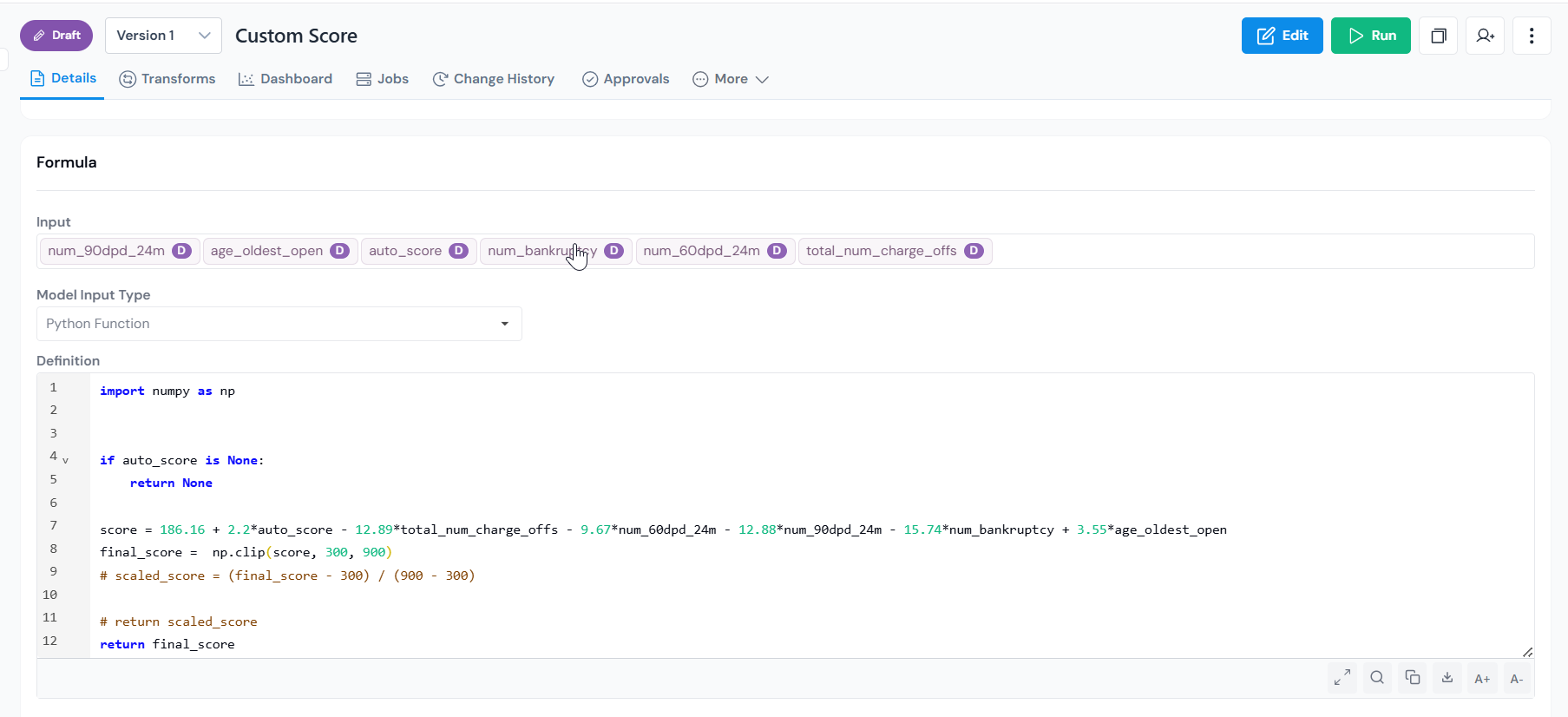
1.  **Register as a Model**

    Every input the model depends on is validated as a registered approved
    object. Lineage is automatic. Every version is tracked,
    every change recorded with timestamps and authors.

    <figure>
      <img src="/images/getting-started/start-with-model/start-with-model-01-model-input-page.png" alt="Model input page in Corridor for registering a new model." class="screenshot" loading="lazy" />
      <figcaption>Model registration form where you select inputs and upload the model file.</figcaption>
    </figure>

2.  **Simulate on your data before deployment**

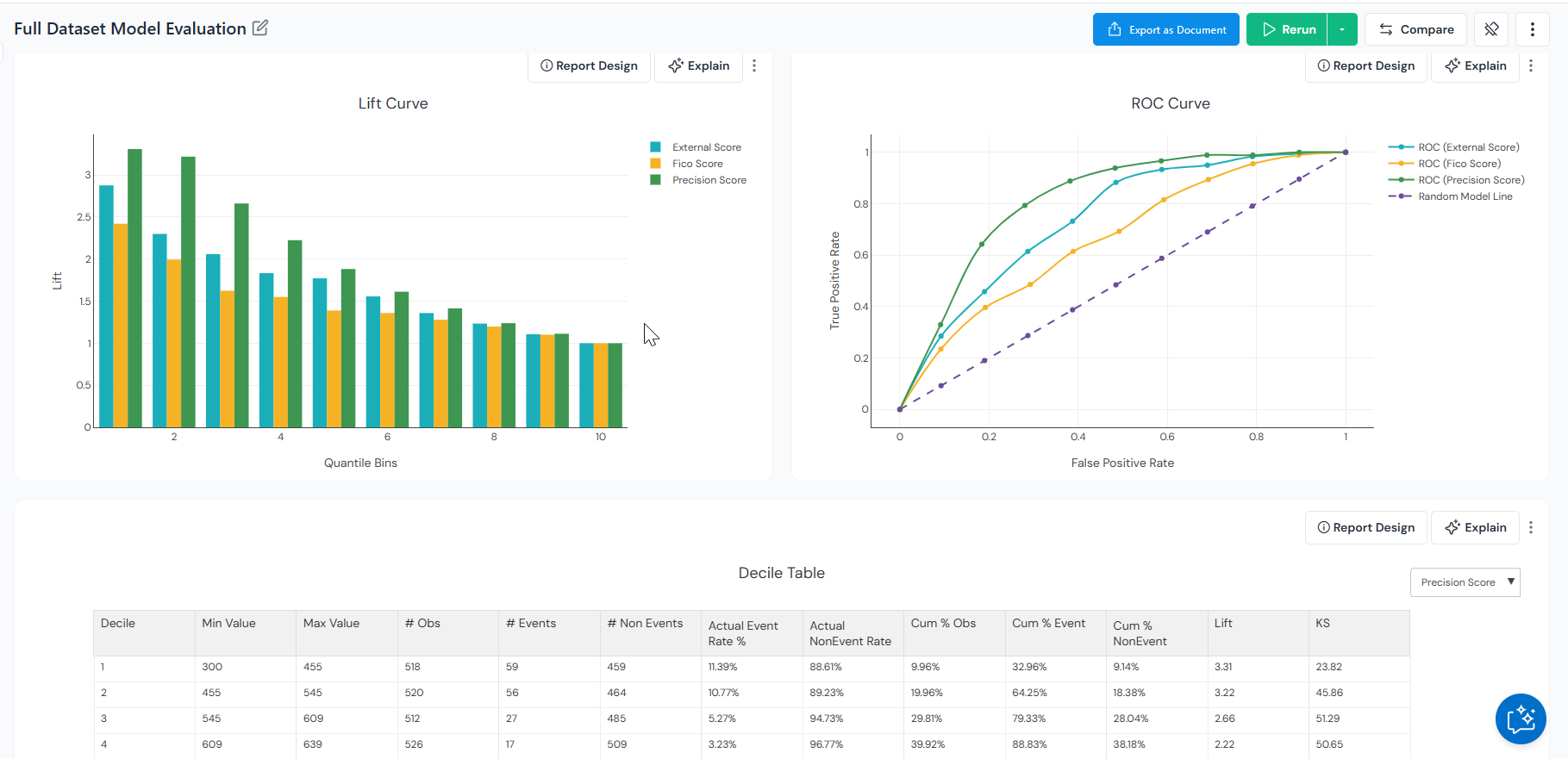
    Before a model goes live, you need to know how it behaves on your actual data. Run a simulation to produce the full results including performance reports, score distributions, and any custom dashboards configured for the model. These outputs can be attached to the approval request as validation evidence.

    <figure>
      <img src="/images/getting-started/start-with-model/start-with-model-02-simulation-reports.png" alt="Simulation reports for a registered model in Corridor showing performance metrics and dashboards." class="screenshot" loading="lazy" />
      <figcaption>Simulation reports with performance metrics, score distributions, and configured dashboards.</figcaption>
    </figure>

    *Champion vs. challenger comparison.* 
    Pit the candidate model against the current production model on the same dataset. Review side-by-side metrics like AUC, KS, and lift, see where the two models agree and disagree, and decide whether the new model is worth promoting to production.


3.  **Govern through formal approvals**

    <figure>
      <img src="/images/getting-started/start-with-model/start-with-model-03-model-details-page.png" alt="Registered model page in Corridor with Run, Version, Status, and Lineage highlighted." class="screenshot" loading="lazy" />
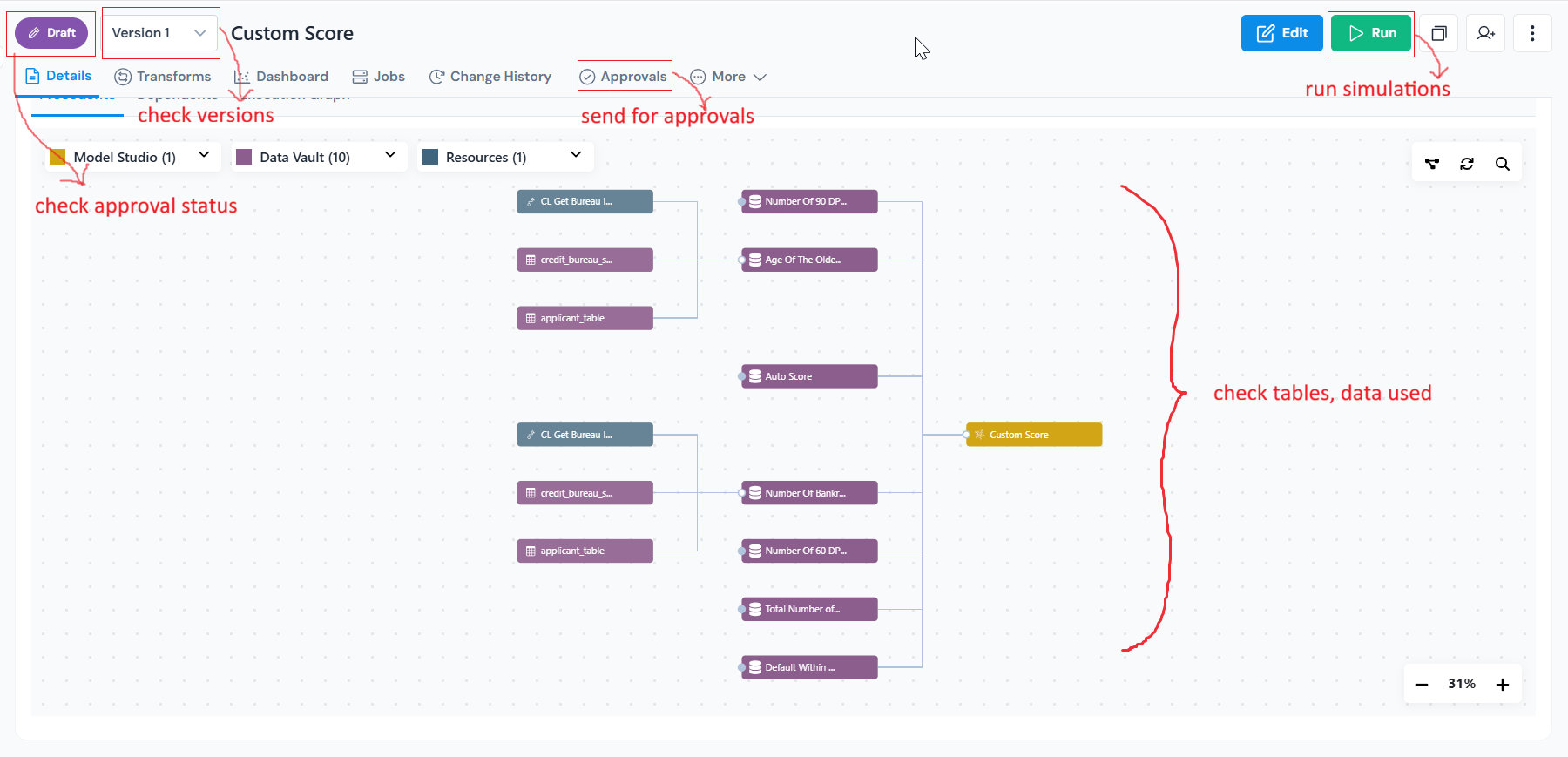
      <figcaption>Registered model page showing Run, Version, Status, and Lineage at a glance.</figcaption>
    </figure>

    Route models through formal approval workflows before deployment.

    Reviewers can inspect lineage, simulation outputs, comments, governance history, and validation evidence directly from the approval flow.

    <figure>
      <img src="/images/getting-started/start-with-model/start-with-model-04-audit-log.png" alt="Audit log for a registered model in Corridor showing change history with timestamps and authors." class="screenshot" loading="lazy" />
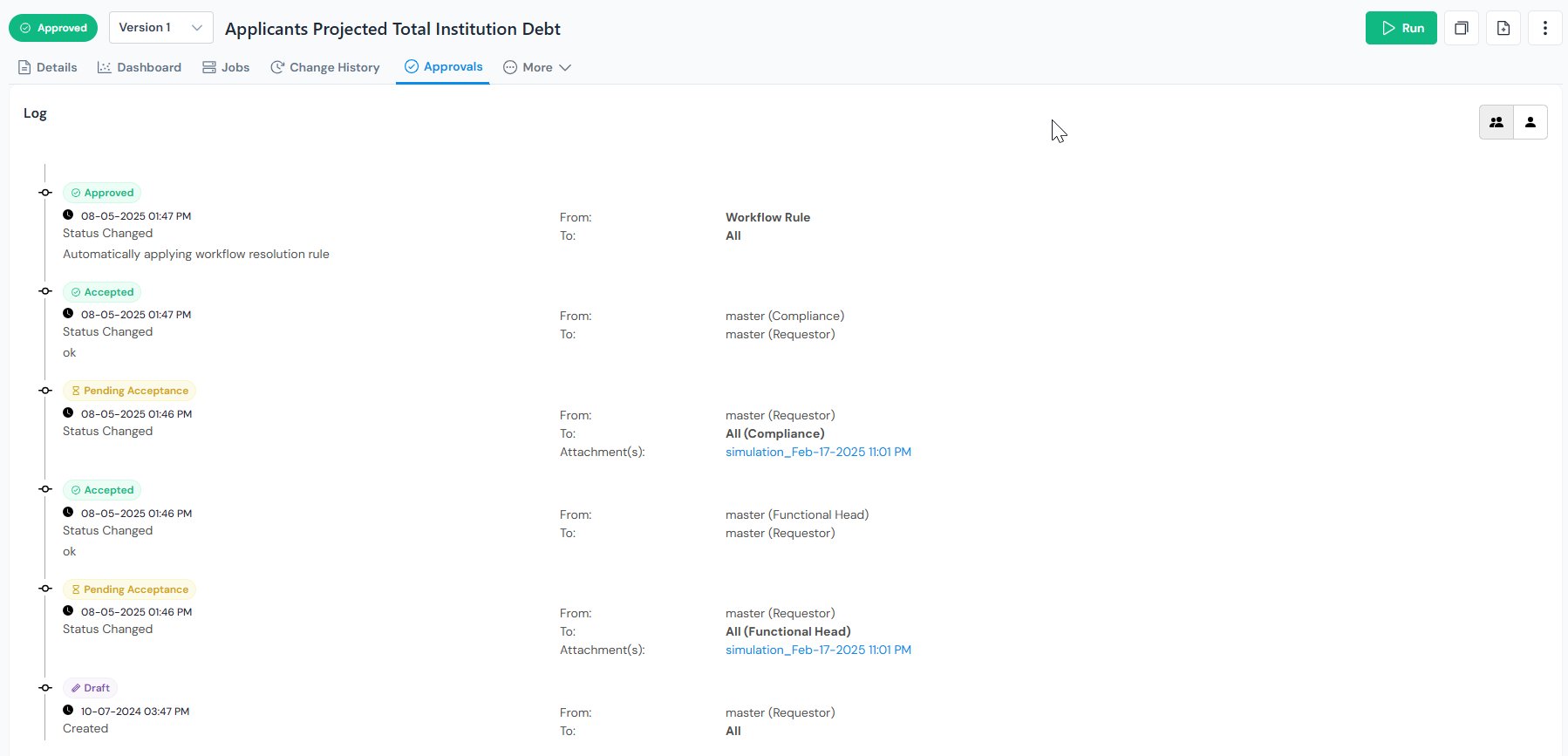
      <figcaption>Audit log capturing every change, reviewer action, and approval event for the model.</figcaption>
    </figure>

    Approved model versions can be promoted across environments while preserving governance history and traceability.

4.  **Monitor in production**

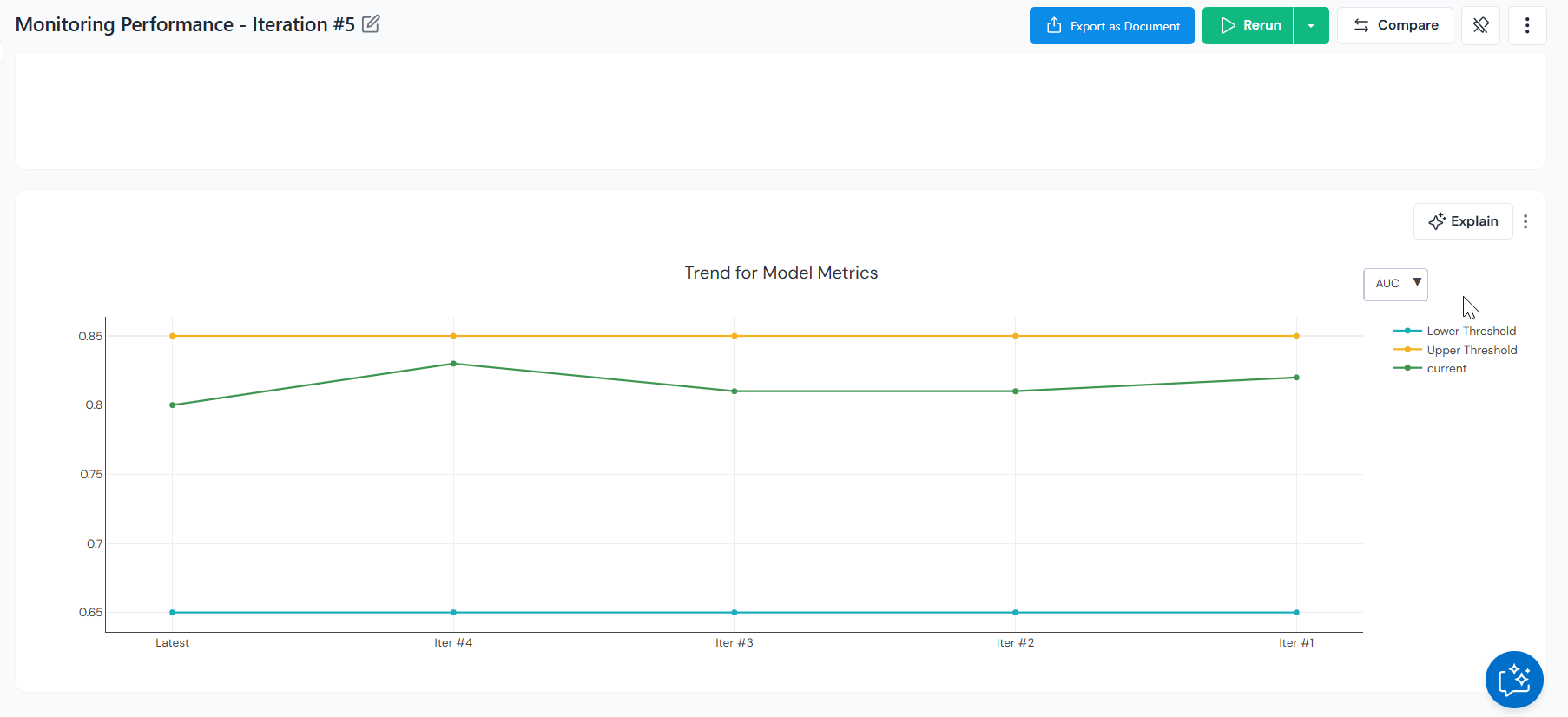
    Track drift, alerts, governance status, and model health over time through Monitoring Dashboards.

    <figure>
      <img src="/images/getting-started/start-with-model/start-with-model-05-monitor-performance.png" alt="Model monitoring dashboard in Corridor showing performance and drift metrics over time." class="screenshot" loading="lazy" />
      <figcaption>Monitoring dashboard tracking drift, accuracy, and alerts across production runs.</figcaption>
    </figure>

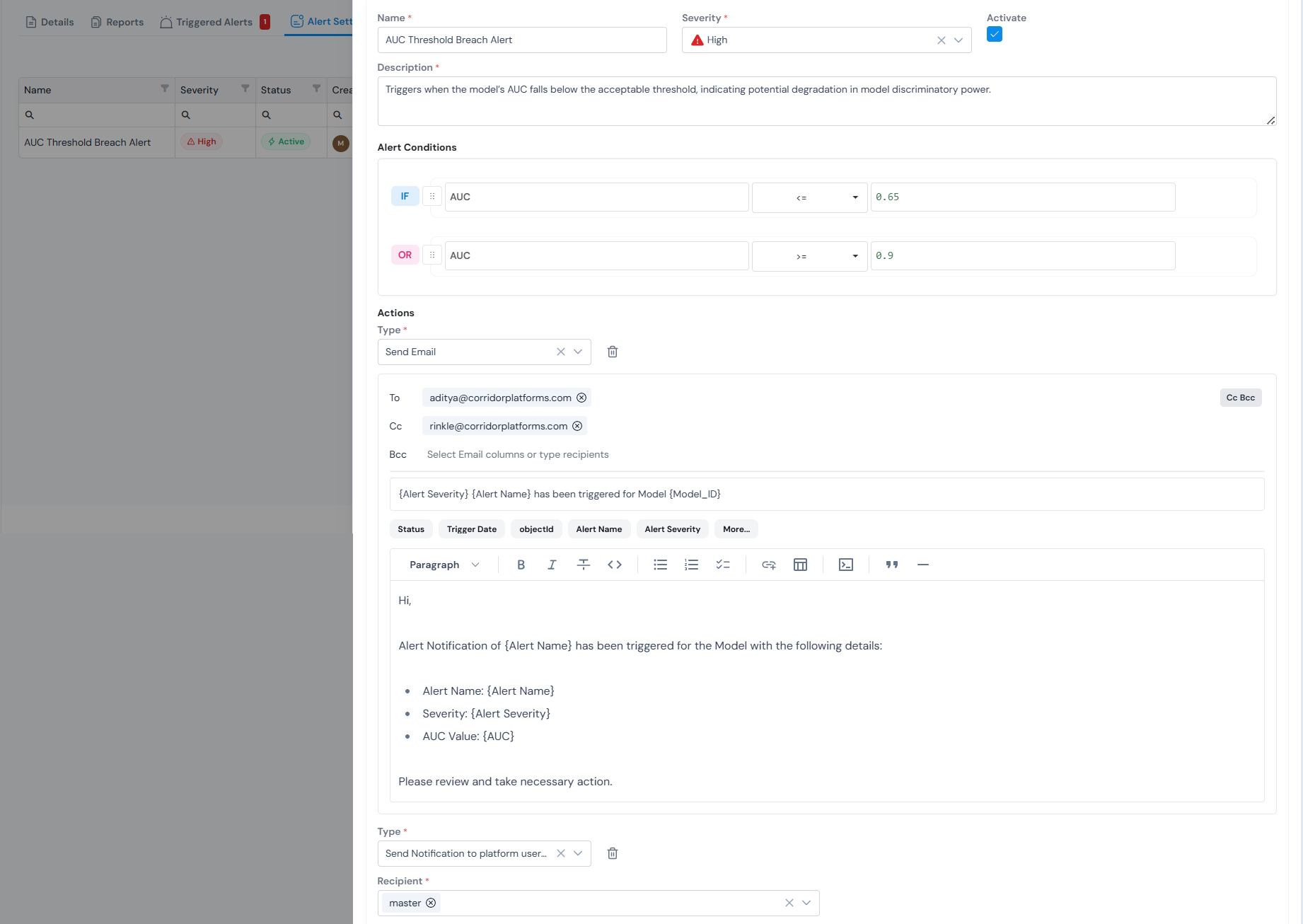
    Configure thresholds on any tracked metric so that breaches surface as alerts the moment they happen, you can set to send emails, notifications or flag these breaches.

    <figure>
      <img src="/images/getting-started/start-with-model/start-with-model-06-monitoring-dashboard-alerts.png" alt="Monitoring dashboard alerts for a registered model in Corridor." class="screenshot" loading="lazy" />
      <figcaption>Threshold-based alerts flag drift and performance issues as soon as they breach.</figcaption>
    </figure>

    When performance changes, teams can retrain, version, review, and revalidate models through the same governed workflow.

---

## Register a model?

Select the inputs (data elements and features) and upload the model file.

If your data elements and features are not set up yet, work through
those first.

For the full step-by-step walkthrough see
[Register a Model Definition](/user-guide/how-tos/register-a-model-definition/).