---
title: "Start with a Policy"
description: "A guided walkthrough of building, testing, and deploying your first decision policy on Corridor."
---

<div style="padding: 14px 16px; border: 0.5px solid #AFA9EC; border-radius: 12px; background: #EEEDFE; margin-bottom: 1.5rem;">
  <div style="display: flex; align-items: center; gap: 7px; margin-bottom: 8px;">
    <svg width="16" height="16" viewBox="0 0 16 16" fill="none">
      <path d="M9 2L4 9h4l-1 5 5-7H8l1-5z" stroke="#7f77dd" stroke-width="1.2" stroke-linecap="round" stroke-linejoin="round"/>
    </svg>
    <span style="font-size: 11px; font-weight: 500; letter-spacing: 0.05em; text-transform: uppercase; color: #534AB7;">TL;DR</span>
  </div>
  <div style="font-size: 13px; color: #3C3489; line-height: 1.65;">
    Register your decision workflow in Corridor and it becomes a governed,
    auditable policy. Combine rules, features or models, test on real data, run
    champion-challenger comparisons, trace individual application outcomes,
    get formal approvals, and monitor performance in production. Supports
    prospecting, underwriting, and customer management decisions.
  </div>
</div>

---

A model tells you *what is likely* (for example, "this borrower has a 23% chance of defaulting"). A **policy** is what decides *what to do about it*: approve, decline, offer a smaller amount, reprice, or route to a human reviewer.

A policy in Corridor is a registered decision workflow that strings together rules, features, and model scores to produce an outcome. Once registered, it becomes a governed object with full lineage, version history, and an audit trail from configuration through to production.

Policies cover the full credit decisioning lifecycle:

- **Prospecting:** find and pre-qualify customers before they apply (for example, a pre-approved personal loan offer for savings account holders with FICO > 700).
- **Underwriting:** approve, decline, counter-offer, or refer an application at the point of decision, with segment-specific branches and risk-based pricing.
- **Customer Management:** ongoing decisions on the existing book, such as automatic credit-line increases for borrowers who have been 0 DPD for 18 months, or early-warning triggers when an EMI is missed.

Corridor brings all three into one governed platform, tightly integrated with analytic models and connected to your existing applications, databases, and vendors. Approved policies deploy as artifacts or as fully customized API endpoints.

## The Policy Lifecycle

The flowchart below walks through the full policy lifecycle, from registering your source data and building risk attributes, through composing and simulating the decision workflow, to monitoring portfolio performance once the policy is live.


<style>
.sl-markdown-content .policy-flow { max-width: 1880px; margin: 0 auto; padding: 0; color: #111827; font-family: "Manrope", "DM Sans", ui-sans-serif, system-ui, sans-serif; }.sl-markdown-content .policy-flow .flow-wrap { background: #FFFFFF; border: none; border-radius: 0; padding: 0; }.sl-markdown-content .policy-flow .flow-wrap svg { display: block; width: 100%; height: auto; }.sl-markdown-content .policy-flow .node rect.node-bg { stroke-width: 1; stroke-opacity: 0.55; }.sl-markdown-content .policy-flow .node .num { font-family: "JetBrains Mono", ui-monospace, SFMono-Regular, Menlo, monospace; font-size: 10px; font-weight: 600; letter-spacing: 0.04em; fill-opacity: 0.85; }.sl-markdown-content .policy-flow .node .title { font-family: "DM Sans", ui-sans-serif, system-ui, sans-serif; font-weight: 600; font-size: 13.5px; fill: #1F2937; }.sl-markdown-content .policy-flow .node .sub { font-family: "Manrope", "DM Sans", ui-sans-serif, system-ui, sans-serif; font-size: 11px; fill: #4B5563; }.sl-markdown-content .policy-flow .node .eg { font-family: "JetBrains Mono", ui-monospace, SFMono-Regular, Menlo, monospace; font-size: 10px; fill: #6B7280; letter-spacing: 0.01em; }.sl-markdown-content .policy-flow .node .module { font-family: "Manrope", "DM Sans", ui-sans-serif, system-ui, sans-serif; font-size: 9.5px; font-weight: 600; letter-spacing: 0.08em; text-transform: uppercase; fill-opacity: 0.75; }.sl-markdown-content .policy-flow .group-rect { fill: none; stroke-width: 1.25; stroke-dasharray: 6 5; rx: 14; ry: 14; }.sl-markdown-content .policy-flow .group-tint { rx: 14; ry: 14; }.sl-markdown-content .policy-flow .group-label { font-family: "Manrope", "DM Sans", ui-sans-serif, system-ui, sans-serif; font-size: 11px; font-weight: 600; letter-spacing: 0.12em; text-transform: uppercase; }.sl-markdown-content .policy-flow .group-label-bg { fill: #FFFFFF; }.sl-markdown-content .policy-flow .arrow { fill: none; stroke: #374151; stroke-width: 1.5; }.sl-markdown-content .policy-flow .arrow.dashed { stroke-dasharray: 4 4; stroke: #6B7280; }.sl-markdown-content .policy-flow .arrow-label { font-family: "Manrope", "DM Sans", ui-sans-serif, system-ui, sans-serif; font-size: 11px; fill: #4B5563; font-weight: 500; }

</style>

<div class="policy-flow">
  <div class="flow-wrap">
    <svg viewBox="0 0 1900 780" role="img" aria-label="Underwriting policy flow on Corridor">
      <defs>
        <marker id="p-arrow-default" viewBox="0 0 10 10" refX="9" refY="5"
                markerWidth="7" markerHeight="7" orient="auto-start-reverse">
          <path d="M0,0 L10,5 L0,10 z" fill="#374151"></path>
        </marker>
      </defs>
      <!-- Pre-Production -->
      <rect class="group-tint" x="280" y="140" width="1400" height="240" fill="#FBF7F1" />
      <rect class="group-rect" x="280" y="140" width="1400" height="240" stroke="#F59E0B" stroke-opacity="0.5" />
      <rect class="group-label-bg" x="296" y="126" width="248" height="26" rx="5"
            stroke="#F59E0B" stroke-opacity="0.75" stroke-width="1.25" />
      <text class="group-label" x="308" y="144" fill="#92400E"
            style="font-size: 13px; font-weight: 700;">CORRIDOR · PRE-PRODUCTION</text>
      <!-- Post-Production -->
      <rect class="group-tint" x="280" y="500" width="1400" height="240" fill="#F8FAFC" />
      <rect class="group-rect" x="280" y="500" width="1400" height="240" stroke="#94A3B8" stroke-opacity="0.5" />
      <rect class="group-label-bg" x="296" y="486" width="258" height="26" rx="5"
            stroke="#94A3B8" stroke-opacity="0.75" stroke-width="1.25" />
      <text class="group-label" x="308" y="504" fill="#1E293B"
            style="font-size: 13px; font-weight: 700;">CORRIDOR · POST-PRODUCTION</text>
      <!-- LEFT EXTERNAL: Source data -->
      <g class="node">
        <rect class="node-bg" x="40" y="200" width="220" height="120"
              rx="10" fill="#F8FAFC" stroke="#CBD5E1" />
        <text class="num" x="56" y="222" fill="#1E293B">YOUR DATA · OUTSIDE CORRIDOR</text>
        <text class="title" x="56" y="244">Your Source Data</text>
        <text class="sub" x="56" y="262">Already lives in your stack</text>
        <text class="eg" x="56" y="288">core · LOS · credit bureau report</text>
        <text class="eg" x="56" y="304">loan history · deposit · application</text>
      </g>
      <!-- 01 - Register Data · Data Vault -->
      <g class="node">
        <rect class="node-bg" x="300" y="200" width="175" height="120"
              rx="10" fill="#FAF5FF" stroke="#A855F7" />
        <text class="num"    x="315" y="222" fill="#7E22CE">01</text>
        <text class="module" x="460" y="222" text-anchor="end" fill="#7E22CE">Data Vault</text>
        <line x1="315" y1="230" x2="460" y2="230" stroke="#A855F7" stroke-opacity="0.25" stroke-width="0.75"/>
        <text class="title"  x="315" y="250">Register Data</text>
        <text class="sub"    x="315" y="268">Connect &amp; catalog sources</text>
        <text class="eg"     x="315" y="294">DataTable  (loans, apps)</text>
        <text class="eg"     x="315" y="310">+ DataElement  (fields used)</text>
      </g>
      <!-- 02 - Build Risk Attributes · Feature Engineering -->
      <g class="node">
        <rect class="node-bg" x="495" y="200" width="175" height="120"
              rx="10" fill="#ECFDF5" stroke="#10B981" />
        <text class="num"    x="510" y="222" fill="#065F46">02</text>
        <text class="module" x="655" y="222" text-anchor="end" fill="#065F46">Feature Eng.</text>
        <line x1="510" y1="230" x2="655" y2="230" stroke="#10B981" stroke-opacity="0.3" stroke-width="0.75"/>
        <text class="title"  x="510" y="250">Build Risk Attributes</text>
        <text class="sub"    x="510" y="268">Derived policy variables</text>
        <text class="eg"     x="510" y="294">risk tier  (A+ … E)</text>
        <text class="eg"     x="510" y="310">DTI · PTI · LTV ratios</text>
      </g>
      <!-- 03 - In-House Scorecards · Model Studio -->
      <g class="node">
        <rect class="node-bg" x="690" y="200" width="175" height="120"
              rx="10" fill="#FEFCE8" stroke="#EAB308" />
        <text class="num"    x="705" y="222" fill="#A16207">03</text>
        <text class="module" x="850" y="222" text-anchor="end" fill="#A16207">Model Studio</text>
        <line x1="705" y1="230" x2="850" y2="230" stroke="#EAB308" stroke-opacity="0.35" stroke-width="0.75"/>
        <text class="title"  x="705" y="250">In-House Scorecards</text>
        <text class="sub"    x="705" y="268">Optional, alongside FICO</text>
        <text class="eg"     x="705" y="294">internal member score</text>
        <text class="eg"     x="705" y="310">thin-file / new-to-credit</text>
      </g>
      <!-- 04 - Build The Policy · Underwriting -->
      <g class="node">
        <rect class="node-bg" x="885" y="200" width="175" height="120"
              rx="10" fill="#FDF2F8" stroke="#EC4899" />
        <text class="num"    x="900" y="222" fill="#DB2777">04</text>
        <text class="module" x="1045" y="222" text-anchor="end" fill="#DB2777">Underwriting</text>
        <line x1="900" y1="230" x2="1045" y2="230" stroke="#EC4899" stroke-opacity="0.3" stroke-width="0.75"/>
        <text class="title"  x="900" y="250">Build The Policy</text>
        <text class="sub"    x="900" y="268">Rules, cutoffs &amp; routing</text>
        <text class="eg"     x="900" y="294">approve · counter · decline</text>
        <text class="eg"     x="900" y="310">tier pricing · refer to UW</text>
      </g>
      <!-- 05 - Simulate · Underwriting -->
      <g class="node">
        <rect class="node-bg" x="1080" y="200" width="175" height="120"
              rx="10" fill="#FDF2F8" stroke="#EC4899" />
        <text class="num"    x="1095" y="222" fill="#DB2777">05</text>
        <text class="module" x="1240" y="222" text-anchor="end" fill="#DB2777">Underwriting</text>
        <line x1="1095" y1="230" x2="1240" y2="230" stroke="#EC4899" stroke-opacity="0.3" stroke-width="0.75"/>
        <text class="title"  x="1095" y="250">Simulate</text>
        <text class="sub"    x="1095" y="268">Replay on past applications</text>
        <text class="eg"     x="1095" y="294">approval rate by tier</text>
        <text class="eg"     x="1095" y="310">why-declined breakdown</text>
      </g>
      <!-- 06 - Approve Policy · Underwriting -->
      <g class="node">
        <rect class="node-bg" x="1275" y="200" width="175" height="120"
              rx="10" fill="#FDF2F8" stroke="#EC4899" />
        <text class="num"    x="1290" y="222" fill="#DB2777">06</text>
        <text class="module" x="1435" y="222" text-anchor="end" fill="#DB2777">Underwriting</text>
        <line x1="1290" y1="230" x2="1435" y2="230" stroke="#EC4899" stroke-opacity="0.3" stroke-width="0.75"/>
        <text class="title"  x="1290" y="250">Approve Policy</text>
        <text class="sub"    x="1290" y="268">Credit committee sign-off</text>
        <text class="eg"     x="1290" y="294">lock version</text>
        <text class="eg"     x="1290" y="310">audit trail · governance log</text>
      </g>
      <!-- 07 - Export Policy Package · Underwriting -->
      <g class="node">
        <rect class="node-bg" x="1470" y="200" width="175" height="120"
              rx="10" fill="#FDF2F8" stroke="#EC4899" />
        <text class="num"    x="1485" y="222" fill="#DB2777">07</text>
        <text class="module" x="1630" y="222" text-anchor="end" fill="#DB2777">Underwriting</text>
        <line x1="1485" y1="230" x2="1630" y2="230" stroke="#EC4899" stroke-opacity="0.3" stroke-width="0.75"/>
        <text class="title"  x="1485" y="250">Export Policy Package</text>
        <text class="sub"    x="1485" y="268">Hand off to your LOS team</text>
        <text class="eg"     x="1485" y="294">rules, cutoffs, scorecard</text>
        <text class="eg"     x="1485" y="310">formats: JSON · PMML</text>
      </g>
      <!-- Iterate sub-frame around Build The Policy + Simulate -->
      <rect x="880" y="178" width="380" height="172" rx="14"
            fill="none" stroke="#6B7280" stroke-width="1.25"
            stroke-dasharray="6 4" opacity="0.6" />
      <rect class="group-label-bg" x="995" y="166" width="150" height="22" rx="4" />
      <text x="1070" y="183" text-anchor="middle"
            style="font-family: 'Manrope', 'DM Sans', ui-sans-serif, system-ui, sans-serif; font-size: 11px; font-weight: 700; letter-spacing: 0.10em; text-transform: uppercase;"
            fill="#374151">ITERATE ↻</text>
      <text x="1070" y="340" text-anchor="middle"
            style="font-family: 'Manrope', 'DM Sans', ui-sans-serif, system-ui, sans-serif; font-size: 10.5px; font-style: italic;"
            fill="#4B5563">build → simulate → tweak → repeat until performance looks right</text>
      <!-- RIGHT EXTERNAL: LOS in production -->
      <g class="node">
        <rect class="node-bg" x="1710" y="380" width="180" height="180"
              rx="10" fill="#F8FAFC" stroke="#94A3B8" />
        <text class="num" x="1726" y="402" fill="#1E293B">RUNS IN YOUR PRODUCTION</text>
        <text class="title" x="1726" y="424">Your LOS &amp; Core</text>
        <text class="sub"   x="1726" y="442">Live member lending</text>
        <text class="eg"    x="1726" y="468">new member applications</text>
        <text class="eg"    x="1726" y="484">approve · counter · decline</text>
        <text class="eg"    x="1726" y="500">booked &amp; funded loans</text>
        <text class="eg"    x="1726" y="516">repayment &amp; delinquency</text>
        <text class="eg"    x="1726" y="540" fill="#334155">e.g. Fiserv Loan Director</text>
      </g>
      <!-- 08 - Bring Data Back In · Data Vault -->
      <g class="node">
        <rect class="node-bg" x="1015" y="560" width="195" height="120"
              rx="10" fill="#FAF5FF" stroke="#C084FC" />
        <text class="num"    x="1030" y="582" fill="#7E22CE">08</text>
        <text class="module" x="1195" y="582" text-anchor="end" fill="#7E22CE">Data Vault</text>
        <line x1="1030" y1="590" x2="1195" y2="590" stroke="#C084FC" stroke-opacity="0.4" stroke-width="0.75"/>
        <text class="title"  x="1030" y="610">Bring Data Back In</text>
        <text class="sub"    x="1030" y="628">Close the loop</text>
        <text class="eg"     x="1030" y="654">apps · decisions · bookings</text>
        <text class="eg"     x="1030" y="670">days past due · charge-offs</text>
      </g>
      <!-- 09 - Monitor Performance · Underwriting -->
      <g class="node">
        <rect class="node-bg" x="770" y="560" width="205" height="120"
              rx="10" fill="#FDF2F8" stroke="#EC4899" />
        <text class="num"    x="786" y="582" fill="#DB2777">09</text>
        <text class="module" x="960" y="582" text-anchor="end" fill="#DB2777">Underwriting</text>
        <line x1="786" y1="590" x2="960" y2="590" stroke="#EC4899" stroke-opacity="0.3" stroke-width="0.75"/>
        <text class="title"  x="786" y="610">Monitor Performance</text>
        <text class="sub"    x="786" y="628">Vintage &amp; portfolio health</text>
        <text class="eg"     x="786" y="654">30 / 60 / 90+ days past due</text>
        <text class="eg"     x="786" y="670">charge-off rate · fair lending</text>
      </g>
      <!-- ARROWS -->
      <path class="arrow" d="M260,260 L300,260" marker-end="url(#p-arrow-default)" />
      <path class="arrow" d="M475,260 L495,260" marker-end="url(#p-arrow-default)" />
      <path class="arrow" d="M670,260 L690,260" marker-end="url(#p-arrow-default)" />
      <path class="arrow" d="M865,260 L885,260" marker-end="url(#p-arrow-default)" />
      <path class="arrow" d="M1060,260 L1080,260" marker-end="url(#p-arrow-default)" />
      <path class="arrow" d="M1255,260 L1275,260" marker-end="url(#p-arrow-default)" />
      <path class="arrow" d="M1450,260 L1470,260" marker-end="url(#p-arrow-default)" />
      <!-- Export → LOS -->
      <path class="arrow" d="M1645,260 L1800,260 L1800,380" marker-end="url(#p-arrow-default)" />
      <text class="arrow-label" x="1808" y="324">deploy</text>
      <!-- LOS → Bring data back -->
      <path class="arrow" d="M1800,560 L1800,620 L1210,620" marker-end="url(#p-arrow-default)" />
      <!-- Bring data back → Monitor -->
      <path class="arrow" d="M1015,620 L975,620" marker-end="url(#p-arrow-default)" />
      <!-- Refine loop -->
      <path class="arrow" d="M872,560 L872,380" marker-end="url(#p-arrow-default)" />
      <rect x="747" y="426" width="250" height="28" rx="6"
            fill="#FFFFFF" stroke="#374151" stroke-width="1.25" />
      <text class="arrow-label" x="872" y="444" text-anchor="middle"
            style="font-weight: 600; fill: #1F2937; font-size: 11.5px;">
        refine attributes, model or thresholds
      </text>
    </svg>
  </div>
</div>

### What happens at each step

<style>
.sl-markdown-content .lifecycle-steps { width: 100%; border-collapse: separate; border-spacing: 0; margin: 1rem 0 1.5rem; font-family: var(--font-ui, ui-sans-serif, system-ui, sans-serif); }.sl-markdown-content .lifecycle-steps thead th { background: #f9fafb; color: #374151; font-weight: 600; font-size: 12.5px; letter-spacing: 0.05em; text-transform: uppercase; text-align: left; padding: 12px 16px; border-bottom: 1px solid #e5e7eb; }.sl-markdown-content .lifecycle-steps tbody td { padding: 14px 16px; border-bottom: 1px solid #f3f4f6; font-size: 14px; color: #1f2937; vertical-align: top; line-height: 1.55; }.sl-markdown-content .lifecycle-steps tbody tr:hover td { background: #fafbfd; }.sl-markdown-content .lifecycle-steps tr.section-header td { background: linear-gradient(90deg, #fde68a 0%, #fffbeb 100%); color: #6b3f08; font-weight: 800; font-size: 13px; letter-spacing: 0.14em; text-transform: uppercase; padding: 14px 16px; border-top: 2px solid #f59e0b; border-bottom: 2px solid #f59e0b; }.sl-markdown-content .lifecycle-steps tr.section-header.external td { background: linear-gradient(90deg, #cbd5e1 0%, #f8fafc 100%); color: #1e293b; border-top-color: #94a3b8; border-bottom-color: #94a3b8; }.sl-markdown-content .lifecycle-steps tr.section-header.post td { background: linear-gradient(90deg, #cbd5e1 0%, #f8fafc 100%); color: #1e293b; border-top-color: #94a3b8; border-bottom-color: #94a3b8; }.sl-markdown-content .step-num { display: inline-block; font-family: var(--font-mono, ui-monospace, monospace); font-size: 11px; font-weight: 700; color: #6b7280; background: #f3f4f6; border-radius: 6px; padding: 2px 8px; margin-right: 8px; letter-spacing: 0.04em; }.sl-markdown-content .step-title { font-weight: 600; color: #111827; }.sl-markdown-content .module-tag { display: inline-block; font-size: 11px; font-weight: 600; padding: 3px 10px; border-radius: 999px; letter-spacing: 0.02em; white-space: nowrap; }.sl-markdown-content .module-tag.data-vault { background: #FAF8FE; color: #6b21a8; }.sl-markdown-content .module-tag.feature-eng { background: #F4FBF7; color: #065f46; }.sl-markdown-content .module-tag.model-studio { background: #FCFAF0; color: #92400e; }.sl-markdown-content .module-tag.underwriting { background: #FDF7FA; color: #9d174d; }.sl-markdown-content .module-tag.external { background: #F5F8FC; color: #1e293b; }

</style>

<table class="lifecycle-steps">
  <thead>
    <tr>
      <th style="width: 28%;">Step</th>
      <th style="width: 20%;">Module</th>
      <th>What you do</th>
    </tr>
  </thead>
  <tbody>
    <tr class="section-header"><td colspan="3">Pre-Production</td></tr>
    <tr>
      <td><span class="step-num">01</span><span class="step-title">Register Data</span></td>
      <td><span class="module-tag data-vault">Data Vault</span></td>
      <td>Connect and catalog your source data eg: loans, applications, credit bureau pulls, deposit history. Register the tables and expose the columns you need as data elements.</td>
    </tr>
    <tr>
      <td><span class="step-num">02</span><span class="step-title">Build Risk Attributes</span></td>
      <td><span class="module-tag feature-eng">Feature Engineering</span></td>
      <td>Transform the raw data into policy-side variables that rules and scorecards consume, e.g., risk tiers, DPDs, DTI, PTI, and LTV ratios.</td>
    </tr>
    <tr>
      <td><span class="step-num">03</span><span class="step-title">In-House Scorecards</span></td>
      <td><span class="module-tag model-studio">Model Studio</span></td>
      <td>Optionally register an internal member scorecard to use alongside FICO, useful for thin-file or new-to-credit segments.</td>
    </tr>
    <tr>
      <td><span class="step-num">04</span><span class="step-title">Build The Policy</span></td>
      <td><span class="module-tag underwriting">Underwriting</span></td>
      <td>Compose the decision workflow made of rules, cutoffs, routing, tier pricing, refer-to-underwriter paths, and approve/counter/decline outcomes.</td>
    </tr>
    <tr>
      <td><span class="step-num">05</span><span class="step-title">Simulate</span></td>
      <td><span class="module-tag underwriting">Underwriting</span></td>
      <td>Replay the policy on past applications. Review approval rates by tier, why-declined breakdowns, and waterfall reports. Iterate across steps 04–05 until performance looks right.</td>
    </tr>
    <tr>
      <td><span class="step-num">06</span><span class="step-title">Approve Policy</span></td>
      <td><span class="module-tag underwriting">Underwriting</span></td>
      <td>Route the locked version through credit committee review and sign-off with full audit trail and governance log attached.</td>
    </tr>
    <tr>
      <td><span class="step-num">07</span><span class="step-title">Export Policy Package</span></td>
      <td><span class="module-tag underwriting">Underwriting</span></td>
      <td>Hand off to your LOS team as a deployable package: rules, cutoffs, and scorecard, exported as JSON or PMML or exposed as an API end point.</td>
    </tr>
    <tr class="section-header external"><td colspan="3">Live Decisioning · Outside Corridor</td></tr>
    <tr>
      <td><span class="step-num">··</span><span class="step-title">Your LOS &amp; Core</span></td>
      <td><span class="module-tag external">Your stack</span></td>
      <td>The exported package runs in your LOS and core (e.g., Fiserv Loan Director), producing live approve/counter/decline decisions on member applications.</td>
    </tr>
    <tr class="section-header post"><td colspan="3">Post-Production</td></tr>
    <tr>
      <td><span class="step-num">08</span><span class="step-title">Bring Data Back In</span></td>
      <td><span class="module-tag data-vault">Data Vault</span></td>
      <td>Flow applications, decisions, bookings, days past due, and charge-offs back into Corridor to close the loop.</td>
    </tr>
    <tr>
      <td><span class="step-num">09</span><span class="step-title">Monitor Performance</span></td>
      <td><span class="module-tag underwriting">Underwriting</span></td>
      <td>Track vintage and portfolio health: 30 / 60 / 90+ DPD, charge-off rate, fair lending. Set thresholdsm alerts to flag performance issues early on. When something drifts, refine attributes, models and re-approve through the same governed flow.</td>
    </tr>
  </tbody>
</table>

## What can you do on a policy?

1.  **Register your policy, strategy and rules**

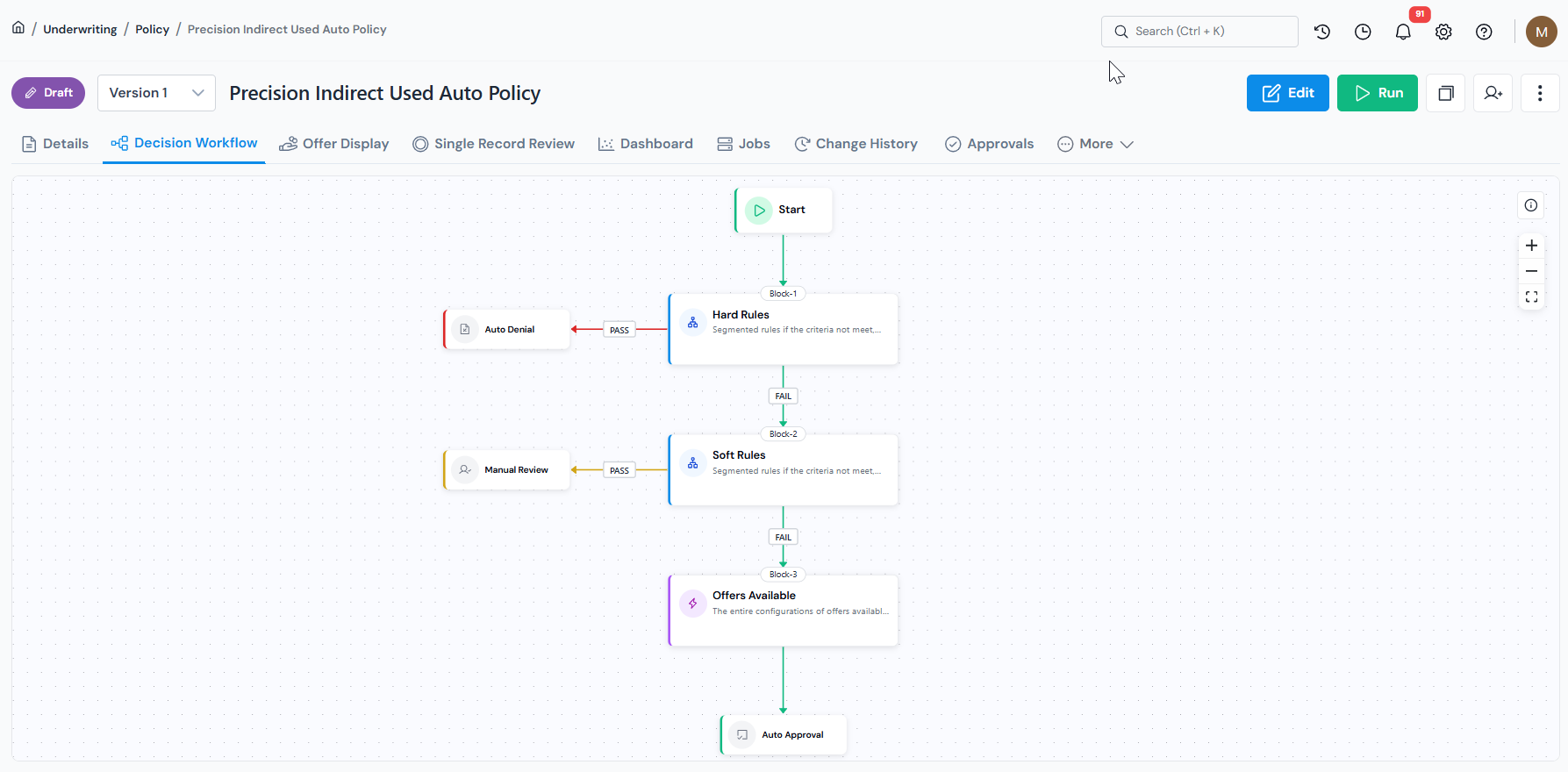
    Every policy is built from approved models, data elements, and features. Lineage is automatic and you can trace every rule and model input back to its source. Every version is tracked and every change is recorded with timestamps and authors.

    <figure>
      <img src="/images/getting-started/start-with-policy/start-with-policy-01-details-page-workflow.png" alt="Registered policy details page in Corridor showing the decision workflow." class="screenshot" loading="lazy" />
      <figcaption>Policy page with the registered decision workflow view.</figcaption>
    </figure>

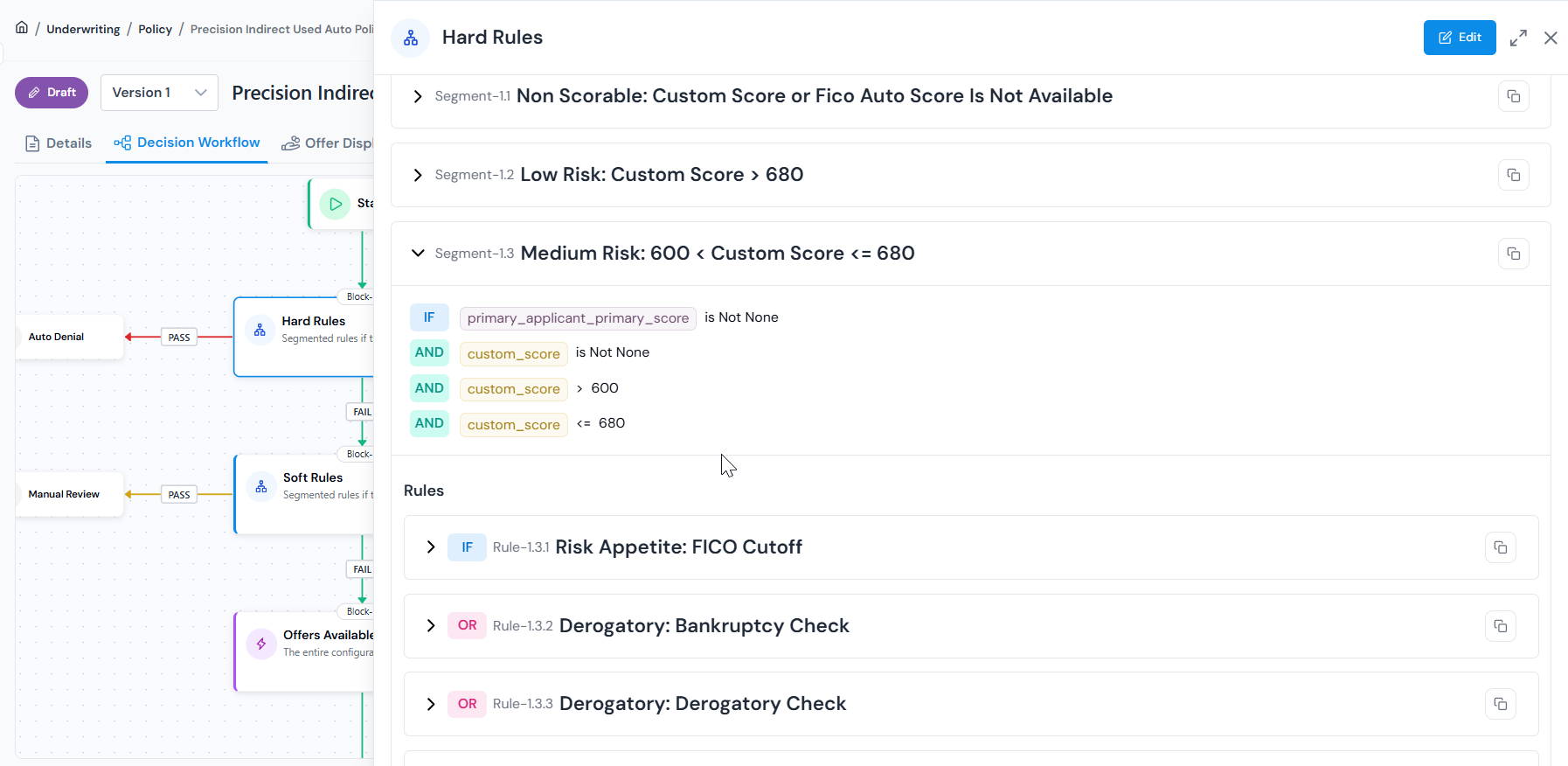
    Corridor integrates models from other vendors, models built in external modeling tools, and models trained natively on the platform, all composable into a single decision workflow.

    <figure>
      <img src="/images/getting-started/start-with-policy/start-with-policy-02-rules-workflow.png" alt="Rules and strategy workflow canvas for a policy in Corridor." class="screenshot" loading="lazy" />
      <figcaption>Compose rules, segments, and model scores into a single executable strategy.</figcaption>
    </figure>

2.  **Simulate on your data before deployment**

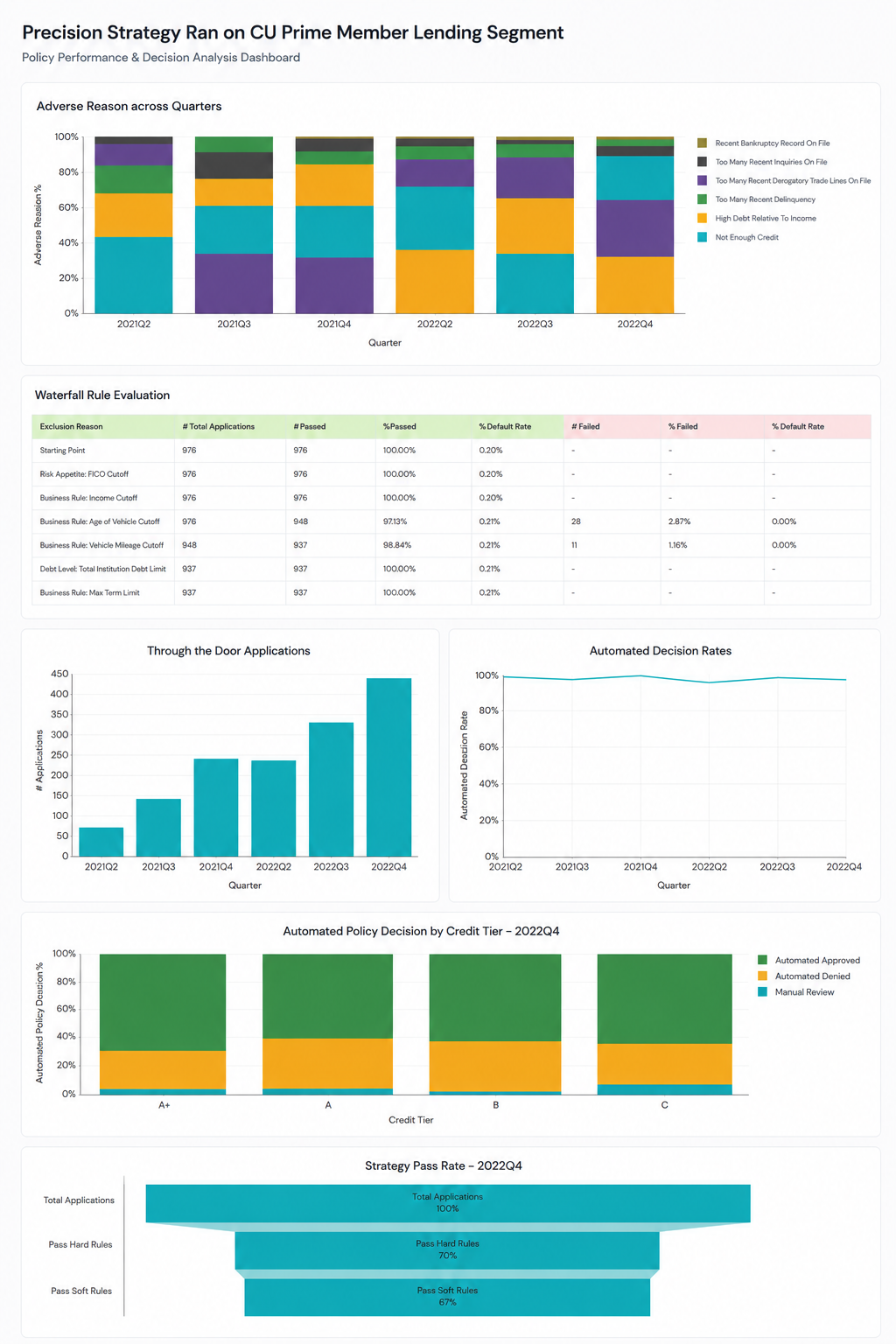
    Run the policy against a real historical dataset and review outcomes in built-in dashboards. Out-of-the-box reporting covers business and risk metrics across applicant cohorts including decision waterfall, marginal impacts of rules, rule automation and performance metrics, and model risk management packages.

    <figure>
      <img src="/images/getting-started/start-with-policy/start-with-policy-03-simulation-report.png" alt="Simulation report for a policy in Corridor showing decision waterfall and performance metrics." class="screenshot" loading="lazy" />
      <figcaption>Simulation report covering decision waterfall, rule impact, and risk metrics across applicant cohorts.</figcaption>
    </figure>

    Run what-if analysis to adjust the policy slightly and see how it compares to the original before committing to any change.

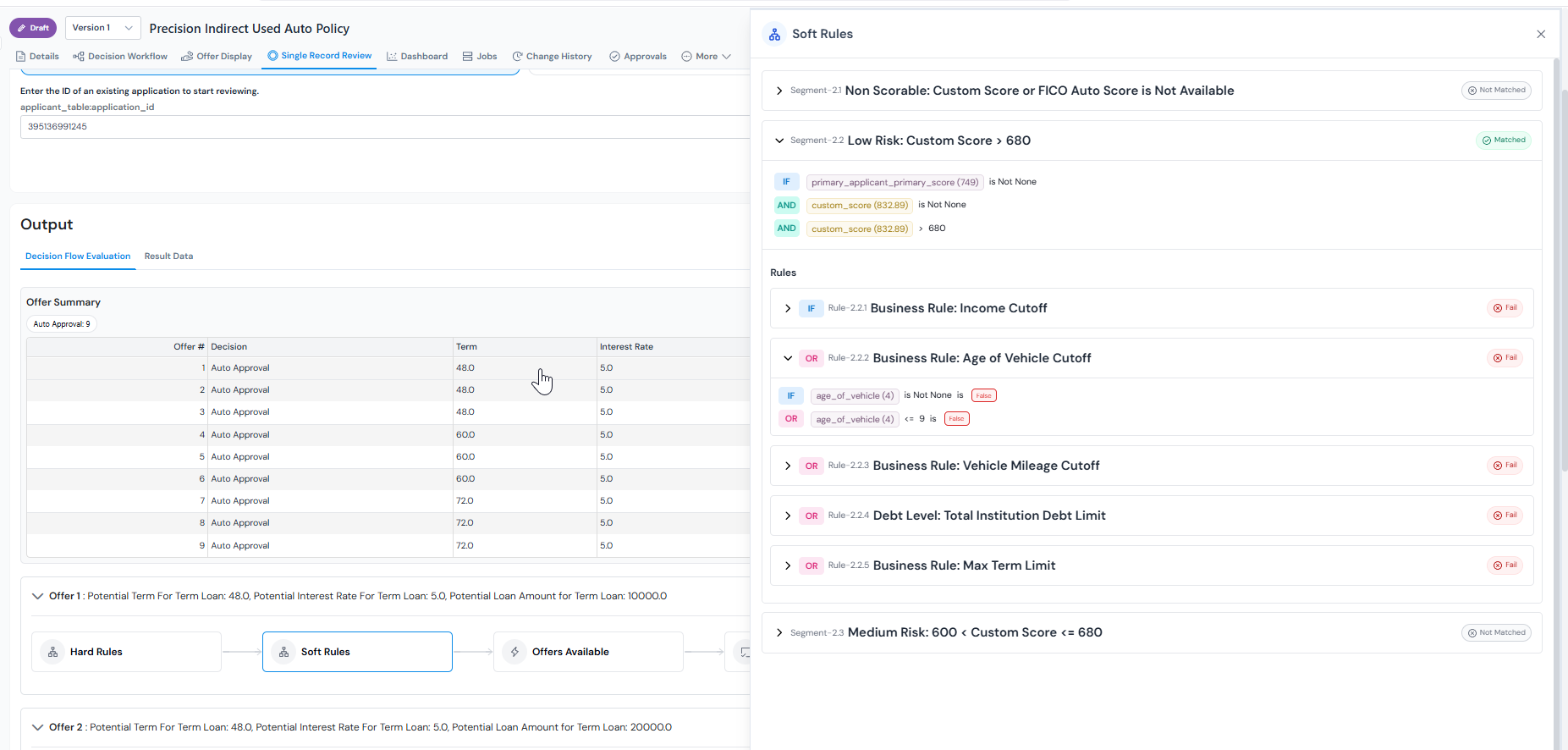
    Use Single Record Review to select any application and trace exactly how it moved through the workflow, which rules passed or failed, what offers were generated, and what the final outcome was.

    <figure>
      <img src="/images/getting-started/start-with-policy/start-with-policy-04-single-record-review.png" alt="Single Record Review for a policy in Corridor, showing the path an individual application took through the decision workflow." class="screenshot" loading="lazy" />
      <figcaption>Single Record Review traces one application end-to-end through the policy workflow.</figcaption>
    </figure>


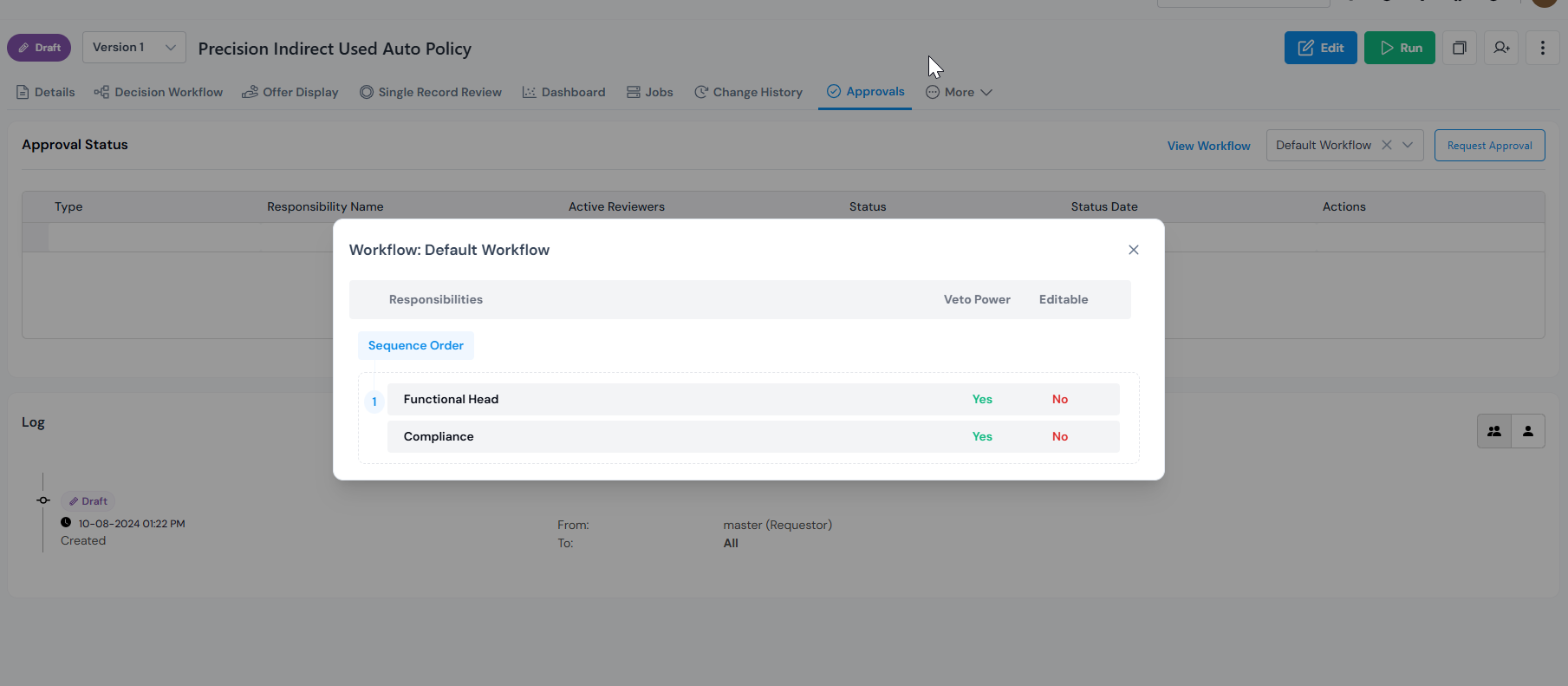
3.  **Govern through formal approvals**

    Every change is a formal step. Reviewers get a dedicated queue where they can inspect the policy, view its lineage, check simulation results, leave comments, and approve or request changes, all in one place. Every decision stays permanently attached to the policy.

    <figure>
      <img src="/images/getting-started/start-with-policy/start-with-policy-05-approval-workflow-view.png" alt="Approval workflow view for a policy in Corridor with reviewer queue and evidence." class="screenshot" loading="lazy" />
      <figcaption>View of the approval workflow with responsbilities to request approval from shown.</figcaption>
    </figure>

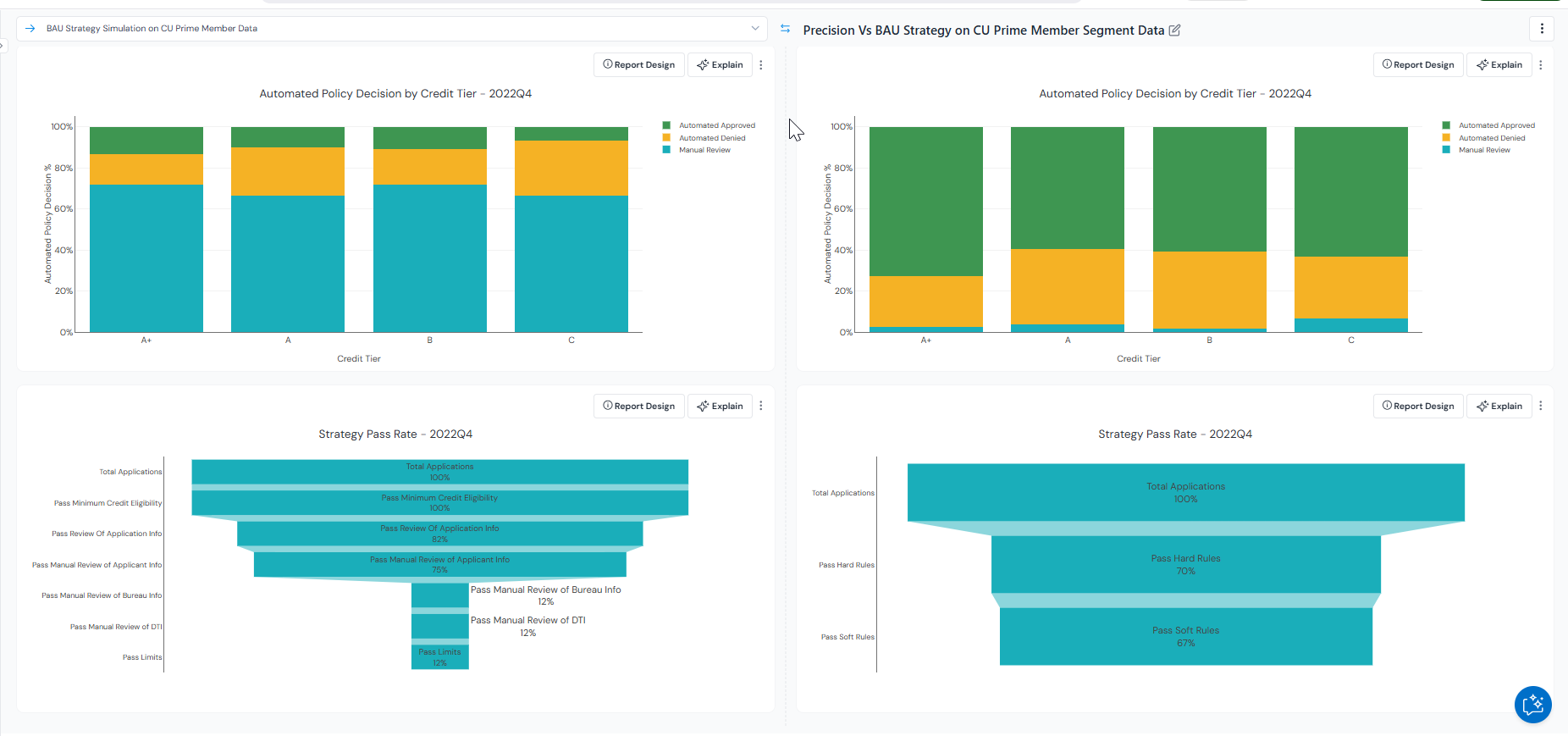
4.  **Run champion-challenger comparisons**

    Run champion-challenger scenarios with a few clicks to test a new strategy against the current production policy. Use the strategy builder to adjust cutoffs, add new segments, or introduce new features as applicant behaviour and market conditions change. Compare outcomes before promoting any changes to production.

    <figure>
      <img src="/images/getting-started/start-with-policy/start-with-policy-06-champion-challenger-comparison.png" alt="Champion-challenger comparison view in Corridor showing two policies evaluated side by side." class="screenshot" loading="lazy" />
      <figcaption>Champion vs. challenger comparison with side-by-side outcomes on the same dataset.</figcaption>
    </figure>

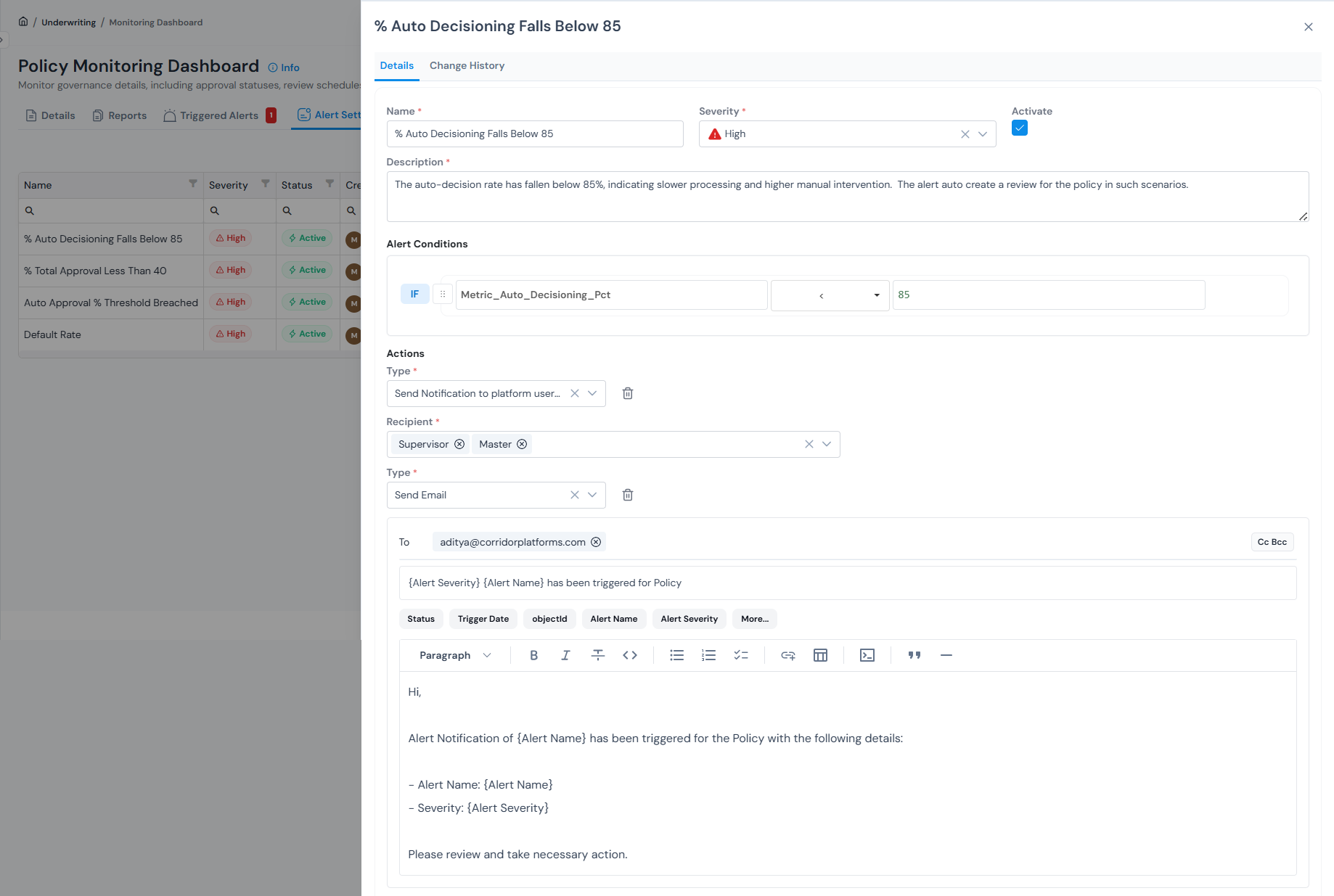
5.  **Monitor in production**

    Set up ongoing monitoring of key KPIs including decision automation level, first payment defaults, approval rates, and conversion ratios. Set alerts on any metric and review governance status across all registered policies in one place.

    <figure>
      <img src="/images/getting-started/start-with-policy/start-with-policy-07-monitoring-dashboard.png" alt="Policy monitoring dashboard in Corridor with KPI tiles, triggered alerts, and email notifications." class="screenshot" loading="lazy" />
      <figcaption>Monitoring dashboard tracking decisioning KPIs, with threshold-based alerts and email notifications.</figcaption>
    </figure>


## Types of policy

Corridor organises policies by where the borrower sits in their journey with you: before they apply, at the point of application, and after they are on your books. The diagram below traces that journey. The same registered-object lifecycle (build, simulate, approve, monitor) applies to all three; only the inputs, outcomes, and cadence change.

<style>
.sl-markdown-content .lifecycle-chart { width: 100%; margin: 1.5rem 0 1.75rem; font-family: var(--font-ui, ui-sans-serif, system-ui, sans-serif); }.sl-markdown-content .lifecycle-chart .lc-row { display: flex; align-items: center; gap: 14px; flex-wrap: nowrap; }.sl-markdown-content .lifecycle-chart .lc-node { flex: 0 0 auto; border: 1px solid var(--lc-border, #e5e7eb); background: var(--lc-bg, #ffffff); border-radius: 12px; padding: 12px 14px; min-width: 110px; max-width: 140px; display: flex; flex-direction: column; justify-content: center; }.sl-markdown-content .lifecycle-chart .lc-node .lc-title { font-size: 13.5px; font-weight: 700; color: var(--lc-title, #111827); letter-spacing: 0.01em; }.sl-markdown-content .lifecycle-chart .lc-node .lc-sub { font-size: 11.5px; color: #6b7280; margin-top: 4px; line-height: 1.4; }.sl-markdown-content .lifecycle-chart .lc-stages { flex: 1 1 0; min-width: 0; border: 1px dashed #d8b4fe; background: #fcfbff; border-radius: 14px; padding: 14px; position: relative; }.sl-markdown-content .lifecycle-chart .lc-stages-label { position: absolute; top: -10px; left: 16px; background: #ffffff; color: #6b21a8; font-size: 10.5px; font-weight: 700; letter-spacing: 0.12em; text-transform: uppercase; padding: 1px 8px; border: 1px solid #d8b4fe; border-radius: 4px; }.sl-markdown-content .lifecycle-chart .lc-stages-row { display: flex; align-items: center; gap: 10px; }.sl-markdown-content .lifecycle-chart .lc-stage { flex: 1 1 0; min-width: 0; border-radius: 10px; padding: 12px 14px; border: 1px solid; overflow: hidden; word-wrap: break-word; overflow-wrap: anywhere; }.sl-markdown-content .lifecycle-chart .lc-stage.prospect { background: #fff7ed; border-color: #fdba74; color: #9a3412; }.sl-markdown-content .lifecycle-chart .lc-stage.underwrite { background: #ecfeff; border-color: #67e8f9; color: #155e75; }.sl-markdown-content .lifecycle-chart .lc-stage.manage { background: #f0fdf4; border-color: #86efac; color: #166534; }.sl-markdown-content .lifecycle-chart .lc-stage .lc-stage-title { font-size: 13px; font-weight: 700; line-height: 1.3; }.sl-markdown-content .lifecycle-chart .lc-stage .lc-stage-sub { font-size: 11px; opacity: 0.85; margin-top: 4px; line-height: 1.45; }.sl-markdown-content .lifecycle-chart .lc-arrow { color: #6b7280; font-size: 18px; line-height: 1; flex: 0 0 auto; display: flex; align-items: center; justify-content: center; align-self: center; }.sl-markdown-content .lifecycle-chart .lc-node.customer { --lc-bg: #f5f3ff; --lc-border: #c4b5fd; --lc-title: #4c1d95; }
@media (max-width: 720px) {.sl-markdown-content .lifecycle-chart .lc-row, .sl-markdown-content .lifecycle-chart .lc-stages-row { flex-wrap: wrap; }.sl-markdown-content .lifecycle-chart .lc-arrow { transform: rotate(90deg); margin: 4px auto; }
}

</style>

<div class="lifecycle-chart">
  <div class="lc-row">
    <div class="lc-node customer">
      <div class="lc-title">Customer</div>
      <div class="lc-sub">Prospect Or Existing Borrower</div>
    </div>
    <div class="lc-arrow">→</div>
    <div class="lc-stages">
      <span class="lc-stages-label">Customer Lifecycle</span>
      <div class="lc-stages-row">
        <div class="lc-stage prospect">
          <div class="lc-stage-title">Prospecting</div>
          <div class="lc-stage-sub">Pre-Approval Offers, Mailers</div>
        </div>
        <div class="lc-arrow">→</div>
        <div class="lc-stage underwrite">
          <div class="lc-stage-title">Underwriting</div>
          <div class="lc-stage-sub">Approve / Decline, Pricing</div>
        </div>
        <div class="lc-arrow">→</div>
        <div class="lc-stage manage">
          <div class="lc-stage-title">Customer Management</div>
          <div class="lc-stage-sub">Credit Line, Cross-Sell, Triggers</div>
        </div>
      </div>
    </div>
  </div>
</div>

<style>
.sl-markdown-content .policy-types { width: 100%; border-collapse: separate; border-spacing: 0; margin: 1.25rem 0 1.5rem; font-family: var(--font-ui, ui-sans-serif, system-ui, sans-serif); border: 1px solid #e5e7eb; border-radius: 12px; overflow: hidden; box-shadow: 0 1px 2px rgba(15, 23, 42, 0.04); }.sl-markdown-content .policy-types thead th { background: #f9fafb; color: #374151; font-weight: 600; font-size: 12.5px; letter-spacing: 0.05em; text-transform: uppercase; text-align: left; padding: 14px 18px; border-bottom: 1px solid #e5e7eb; }.sl-markdown-content .policy-types tbody td { padding: 16px 18px; border-bottom: 1px solid #f1f3f7; font-size: 14px; color: #1f2937; vertical-align: top; line-height: 1.6; }.sl-markdown-content .policy-types tbody tr:last-child td { border-bottom: none; }.sl-markdown-content .policy-types tbody tr:hover td { background: #fafbfd; }.sl-markdown-content .policy-types .type-cell { white-space: nowrap; width: 200px; }.sl-markdown-content .policy-types .type-pill { font-weight: 700; font-size: 13.5px; color: #111827; }.sl-markdown-content .policy-types .example-cell { color: #4b5563; font-size: 13.5px; }

</style>

<table class="policy-types">
  <thead>
    <tr>
      <th style="width: 22%;">Type</th>
      <th style="width: 40%;">What it does</th>
      <th>Example use case</th>
    </tr>
  </thead>
  <tbody>
    <tr>
      <td class="type-cell"><span class="type-pill">Prospecting</span></td>
      <td>Runs on bureau or marketing data to identify and target prospects with the right offer, before they apply.</td>
      <td class="example-cell">Pre-approved personal loan offers for savings account holders with FICO above 700, individually sized and priced.</td>
    </tr>
    <tr>
      <td class="type-cell"><span class="type-pill">Underwriting</span></td>
      <td>Runs at the point of application, evaluating the applicant against your rules, risk attributes, and scorecard cutoffs to return a decision with terms and pricing attached.</td>
      <td class="example-cell">A 36-month loan for a salaried applicant with FICO 742 priced at 11.1% instead of the band rate of 11.5%.</td>
    </tr>
    <tr>
      <td class="type-cell"><span class="type-pill">Customer Management</span></td>
      <td>Runs on your existing book, evaluating customers against updated data and behaviour signals to drive limit changes, cross-sell offers, collections triggers, and early-warning flags.</td>
      <td class="example-cell">Automatic 30% line increase after 18 months at 0 DPD, or a proactive limit cut when utilisation hits 95% and a new bureau enquiry shows up.</td>
    </tr>
  </tbody>
</table>


## Register a policy?

Every policy is built around a decision workflow, a sequence of blocks
that define each step in the evaluation process.

For the full step-by-step walkthrough of every field, block type, and
configuration option see [Register a Policy Decision Workflow](/user-guide/how-tos/register-policy-decision-workflow/).