Release Notes V1.26.02
| Version | 1.26.02 |
|---|---|
| Release Date | 02-27-2026 |
You are viewing the latest release. To browse a specific version, pick one from the Version History list in the left sidebar.
1. Object Registration
1.1 Single Record Review (SRR): Faster Setup + Clearer Results
This release makes SRR easier to run and easier to interpret by streamlining setup and presenting results in the same structure as policy execution.
What’s New:
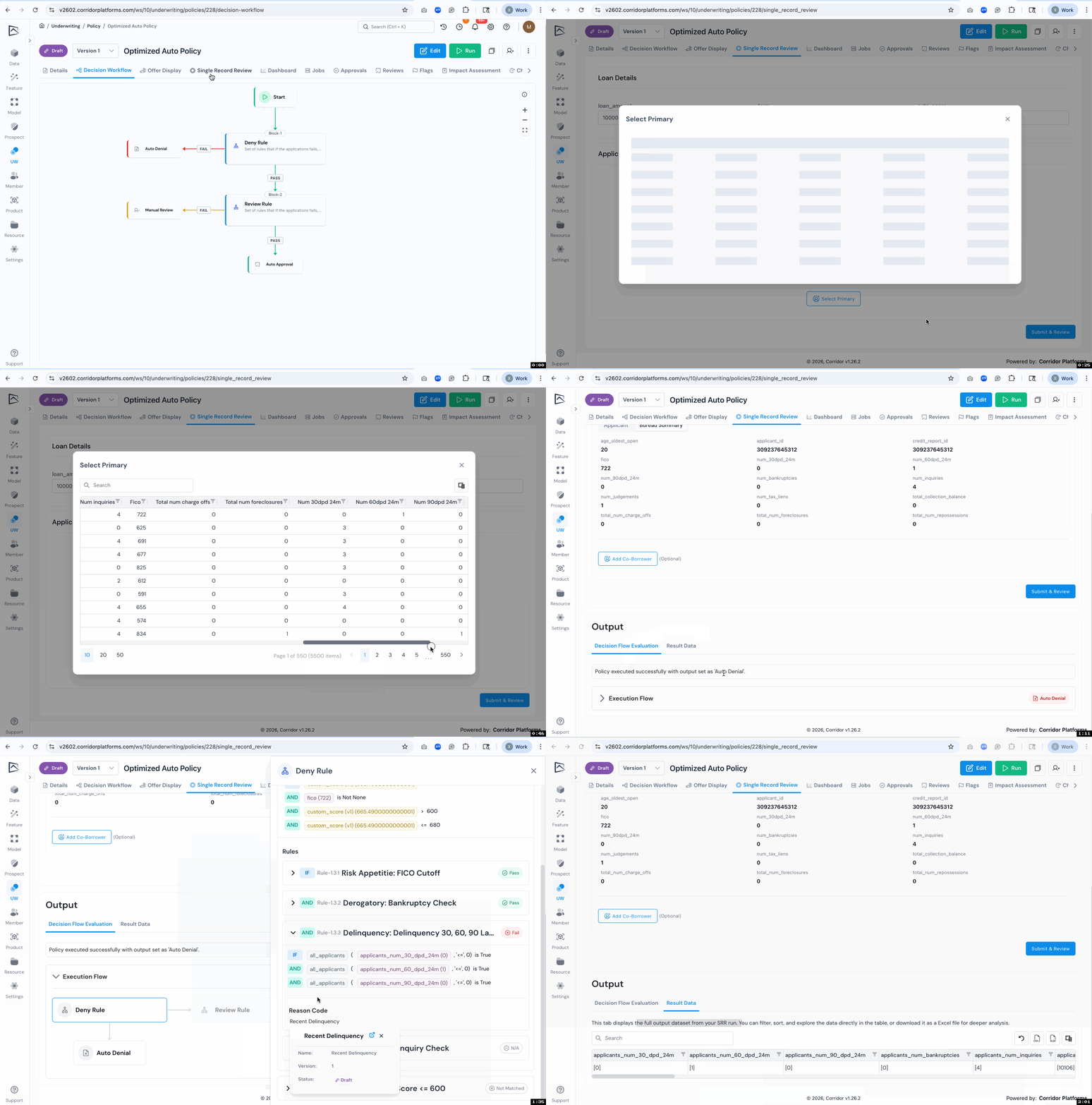
- Guided SRR setup (structured form): Configure SRR fields into clear sections and subsections (for example, Loan Details, Applicant) so people do not have to manually enter every field and can follow a consistent underwriting-style flow.
- Search-and-select applicant picking: Users can search and select applicants to test instead of manually typing all required information, which reduces errors and setup time.
- Policy-path results (decision workflow view): Results now follow the decision workflow structure so it is easier to see what was evaluated, what passed or failed, and where the final outcome came from, including the values used to execute each rule.
- Two Result Tabs for Different Audiences: SRR output includes both a visual decision flow evaluation experience and a data-table oriented result view for deeper inspection, filtering, and export.
1.2 Identify Similar Objects During Create/Copy
When creating or copying objects, Corridor can now surface similar existing registered objects to help prevent duplicates and reduce clutter.
What’s New:
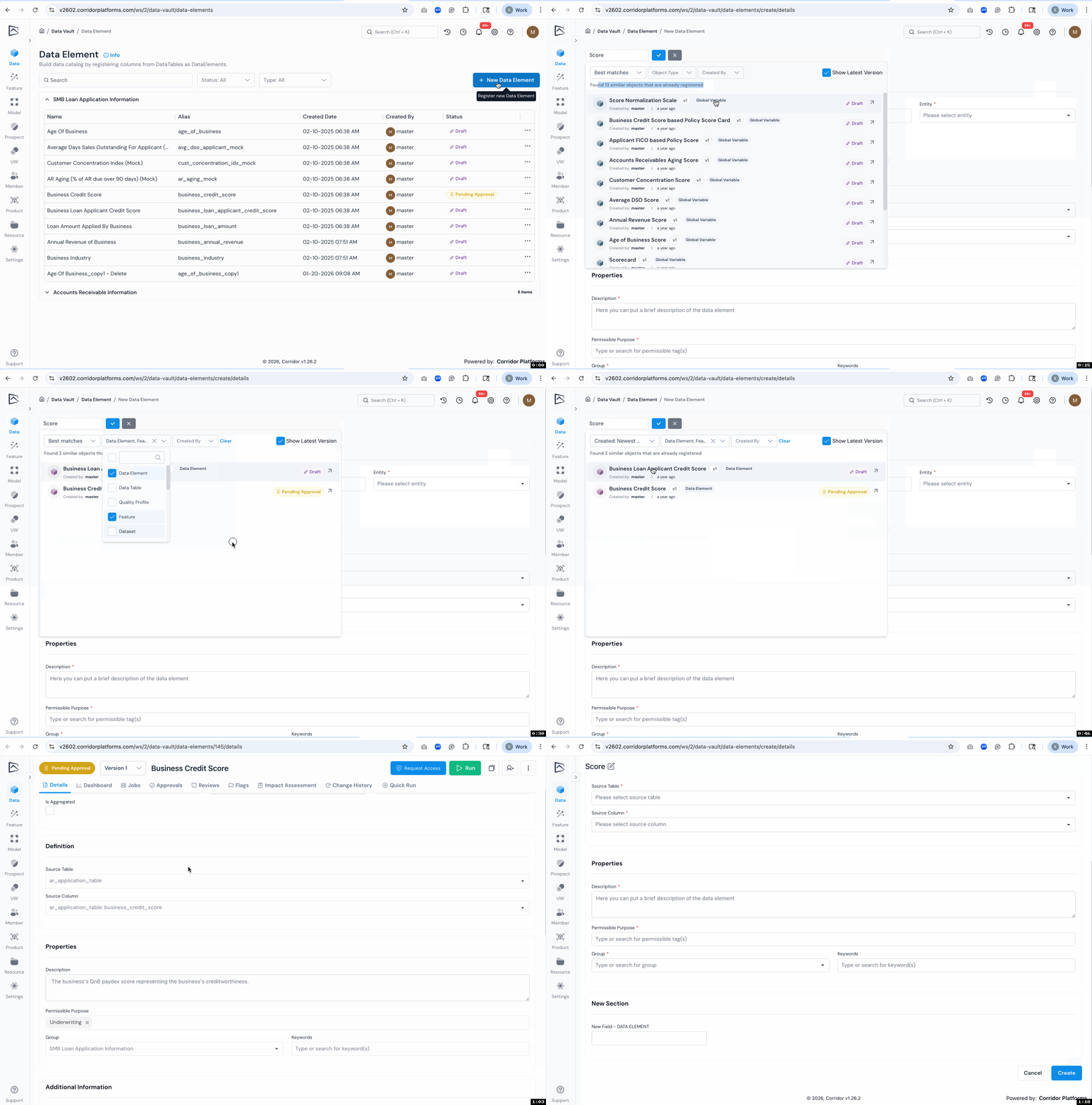
- Similar Object Suggestions While Naming: As you type an object name, Corridor shows a list of similar registered objects directly in the create flow, making it easier to reuse what already exists.
- Better Filtering and “Latest Version Only” View: Suggestions can be filtered (such as by object type) and can default to showing only the latest version to reduce noise.
2. Running Job
2.1 Use Production Scores in Model Monitoring
Model monitoring can now use model outputs generated outside Corridor (such as production scoring pipelines), instead of requiring the platform to re-run the model definition.
What’s New:
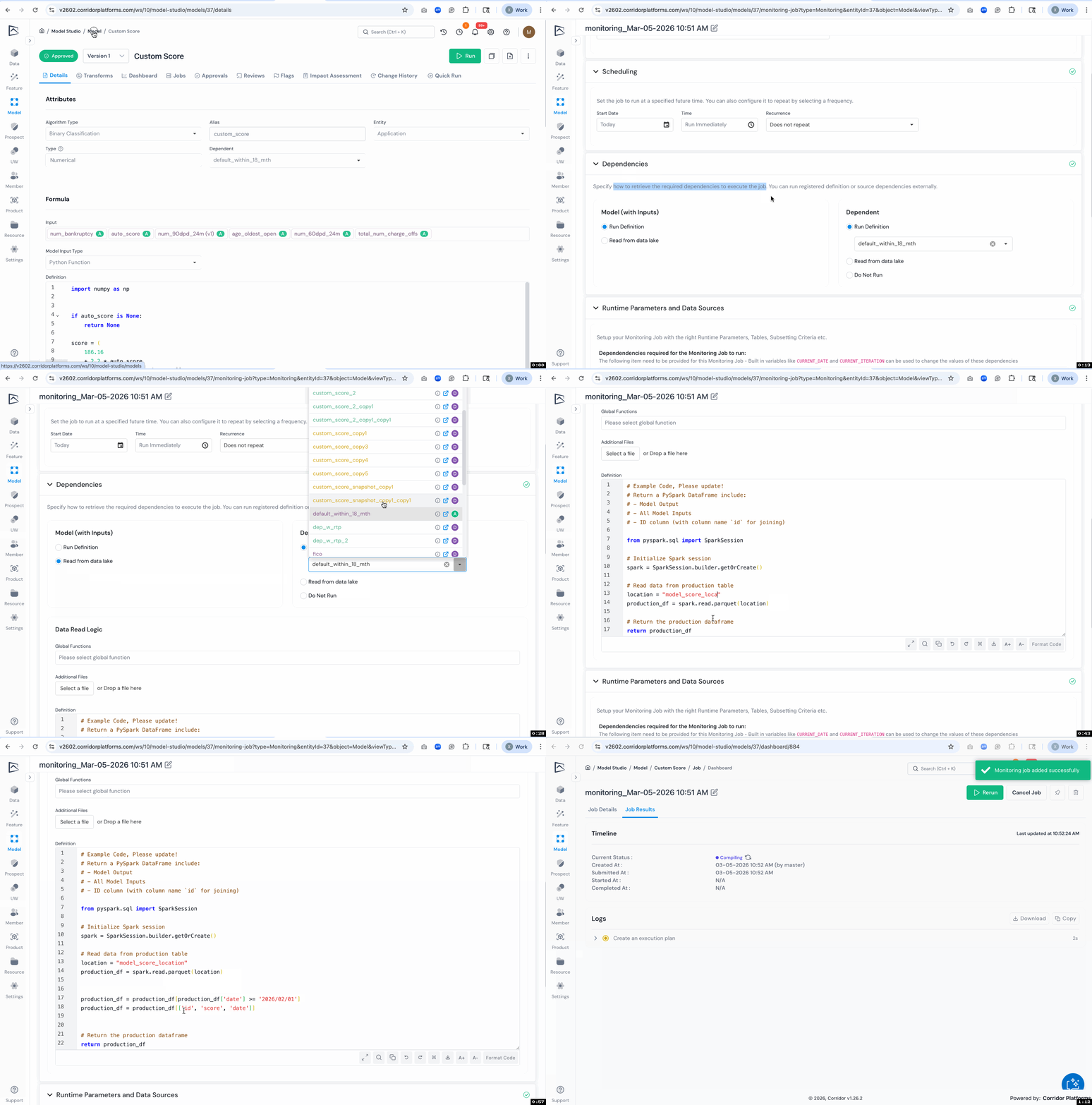
- Dependency Source Selection: In model monitoring jobs, you can choose whether each dependency (model outputs and dependent variable) is produced by running registered definitions or read from an external data source.
- Read‑From‑Data‑Lake Support: When reading externally, you can supply a read definition to retrieve the required data and the platform will join the retrieved data if required.
- More Flexible Monitoring Workflows: This supports real-world governance patterns where production scoring runs outside the platform, while performance monitoring and reporting happens inside Corridor.
2.2 Cancel Running Jobs Without Deleting Them
You can now stop in‑progress jobs without losing the job configuration or needing to re-enter inputs.
What’s New:
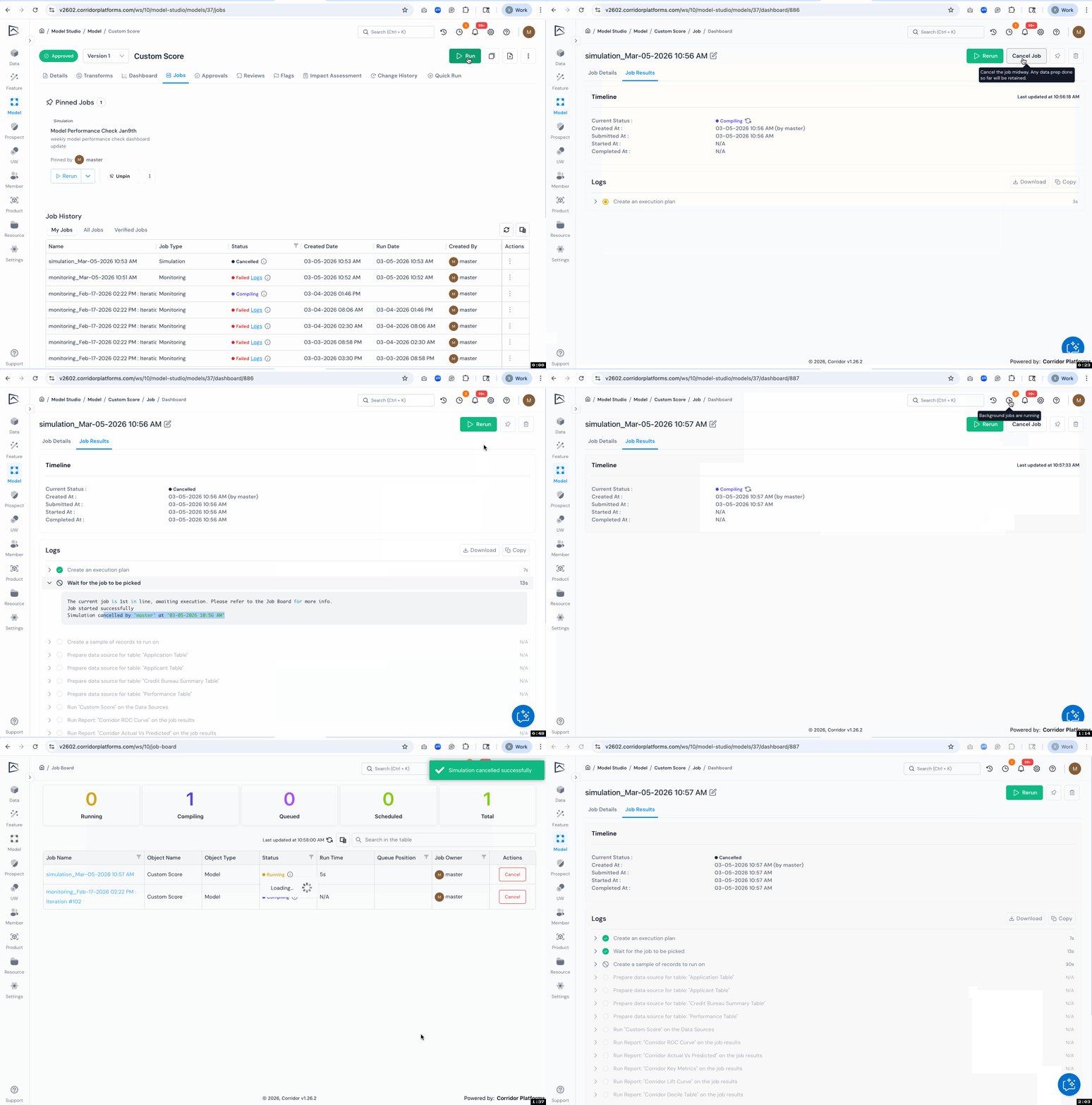
- Cancel In‑Progress Jobs: Jobs in states like queued, compiling, or running can be canceled directly. This is useful when you notice a definition or parameter issue mid-run and want to stop compute early.
- Preserve Job Context for Reruns: Canceling retains key job metadata, so it is easier to rerun without manually re-entering everything from scratch.
3. Approval & Monitoring
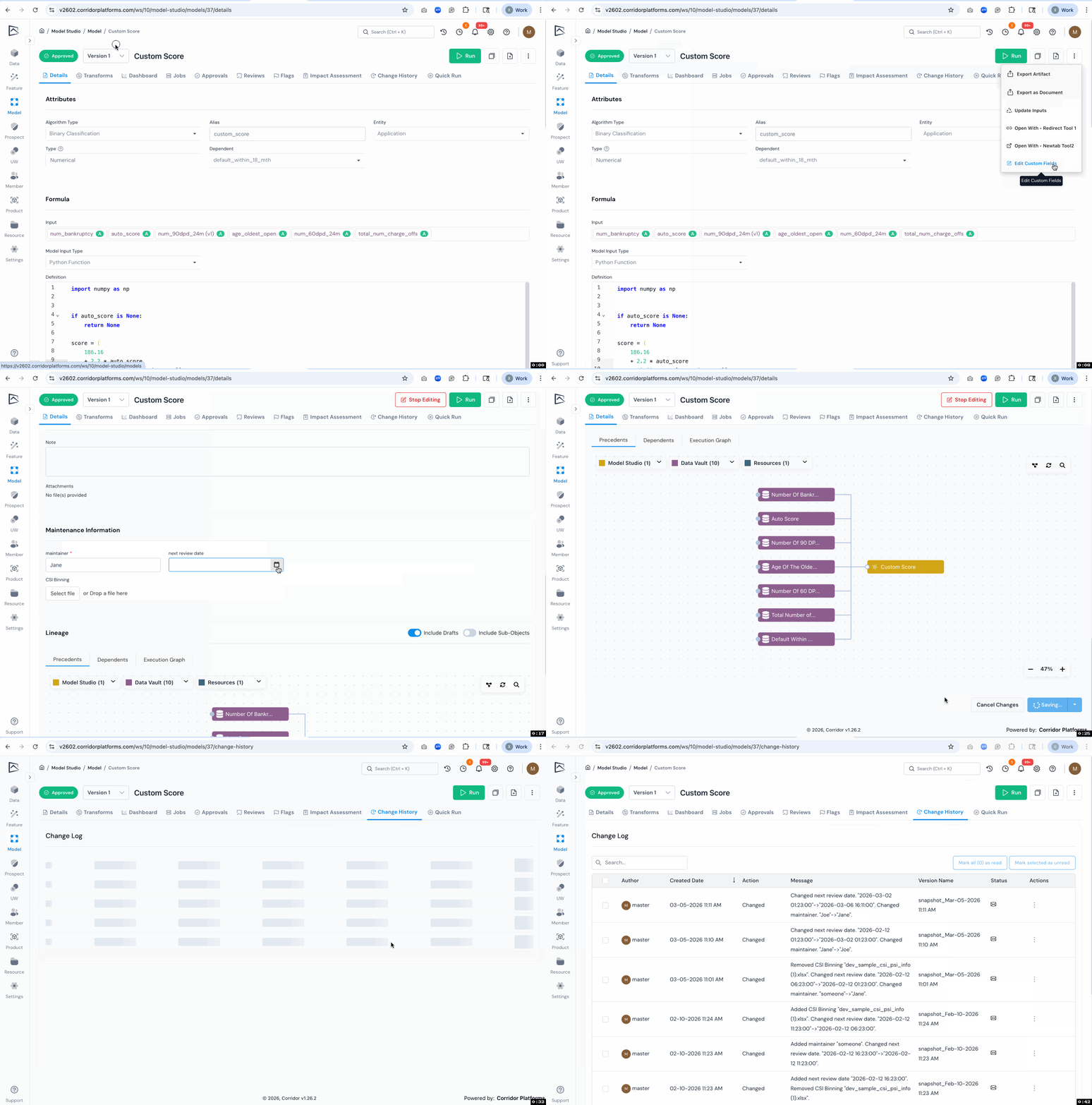
3.1 Enable Edit Approved Objects’ Custom Fields
Admins can now control whether certain custom fields remain editable after an object is approved. This supports attaching operational or reporting metadata that may evolve without changing the core definition.
What’s New:
- Editable After Approval Flag: Custom fields can be marked as editable even in Approved status, while other fields remain locked.
- Focused Editing Entry Point: An “Edit Custom Field” action helps users quickly jump to the editable custom field section when changes are permitted.
- Change History Preserved: Updates to editable custom fields are tracked so teams can audit post-approval modifications.
4. Various Usability Improvements
4.1 Monitoring Dashboard Usability Improvements
This release includes additional fixes and stability improvements for Monitoring Dashboard workflows, with targeted improvements to scrolling, table controls, filtering/search, and date entry.
What’s New:
- Easier Horizontal Scrolling: Users can scroll wide reports horizontally without having to first scroll to the bottom to find the scrollbar.
- Clearer Sort vs. Filter Controls: Increased spacing and improved click targets reduce accidental sorting when trying to apply filters.
- Persist Column Widths Across Sessions (Per User): Resized table columns are retained across sessions so each user can keep preferred layouts.
- More Flexible Search for Numbers and Dates: Column header search and filtering now supports partial matching for numeric and date values, not just exact string matches.
- More Reliable Date Input Formats: Date fields handle 2-digit year inputs (such as MM/DD/YY) more gracefully instead of breaking or converting entries into plain text.