

Release Notes V1.25.4
Ask AI
| Version | 1.25.4 |
|---|---|
| Release Date | April 7, 2025 |
1. Object Registration
Section titled “1. Object Registration”1.1 Copy / Paste inputs when registering objects
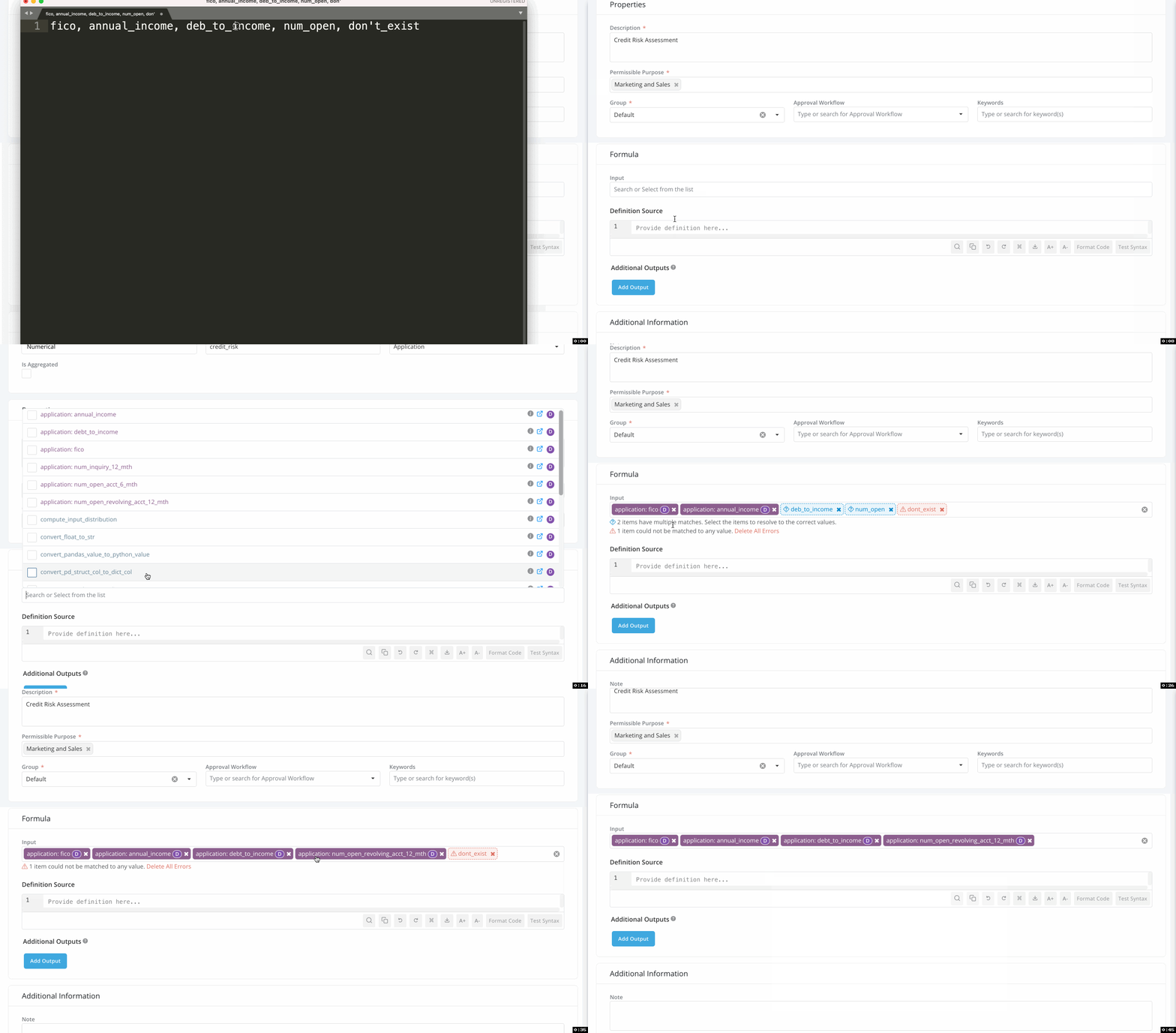
Section titled “1.1 Copy / Paste inputs when registering objects”Simply paste a list of values into input boxes to resolve the values from existing objects registered on the Platform. This makes registration much easier.
With this, you can paste inputs, tables, and columns from notebooks or other code snippets - and let the platform resolve all the items for you!
Key features include:
- Flexible Input Handling: Resolve a single input or an entire list in one step.
- Fuzzy Matching Resolution: Inputs don’t require exact matches. The platform will suggest all the potential resolved objects for your selection.
1.2 Format Code and Inline Syntax Checking
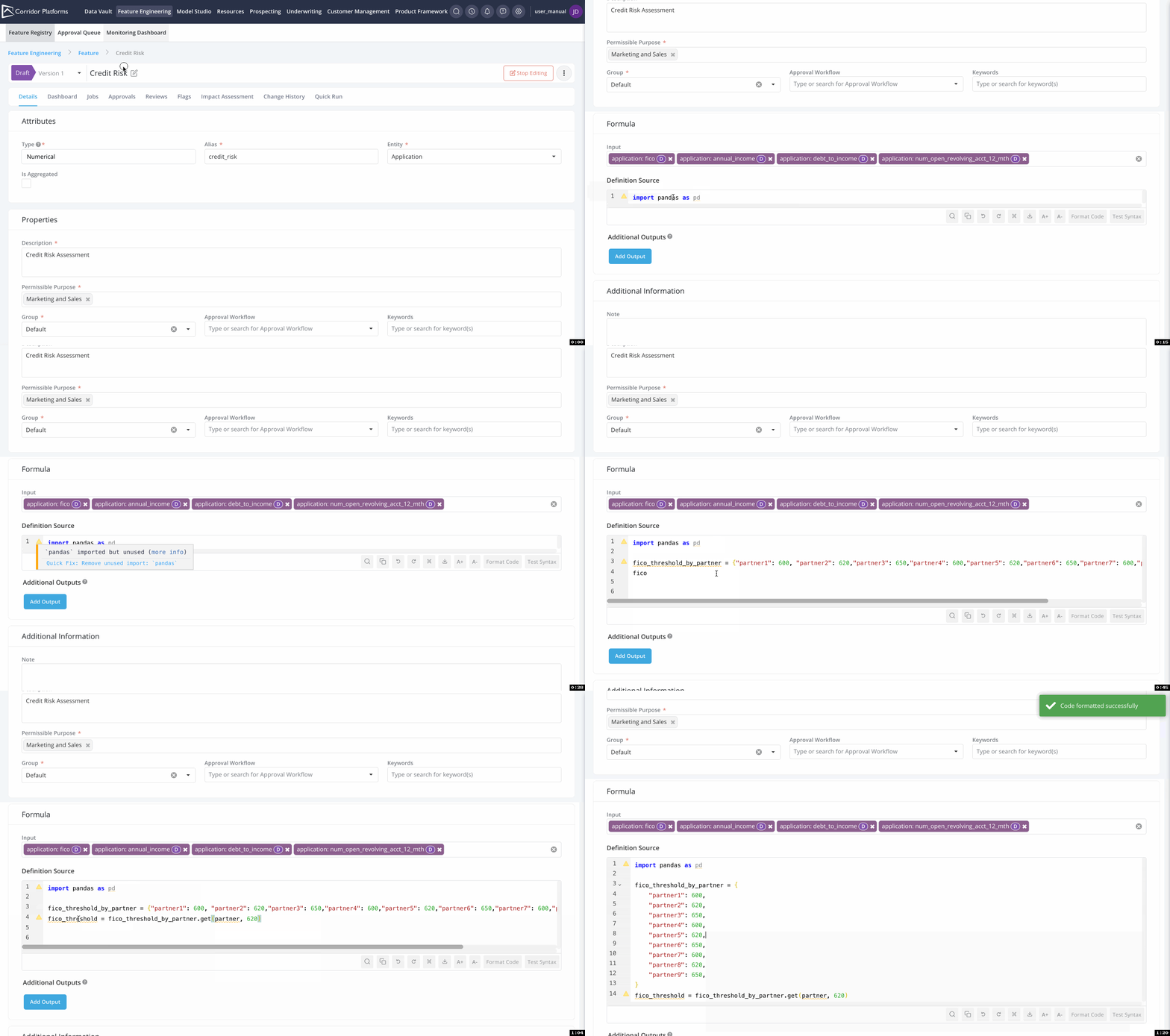
Section titled “1.2 Format Code and Inline Syntax Checking”When registering objects - an important aspect is to ensure the definition is syntactically correct and easy to read. Key features include:
- VS Code-like Experience: Enjoy a familiar coding environment on the platform.
- Real-time Inline Syntax Validation: Standard python syntax highlighting as you write or paste code onto the platform - making it 20x faster than earlier
- 1-Click Code Formatting: Enhance code readability with effortless formatting
Note: The Test Syntax button remains available to help identify syntax issues that might not be caught by the inline syntax check. This includes:
- Detecting unused inputs (those selected in the input box but not utilized in the definition).
- Identifying imports that are used but not listed in the Allowed Python Imports platform setting.
As a result, it’s still recommended to click the Test Syntax button to ensure definitions are correctly registered.
2. Running Jobs
Section titled “2. Running Jobs”2.1 Improved support for Table and Excel Reports
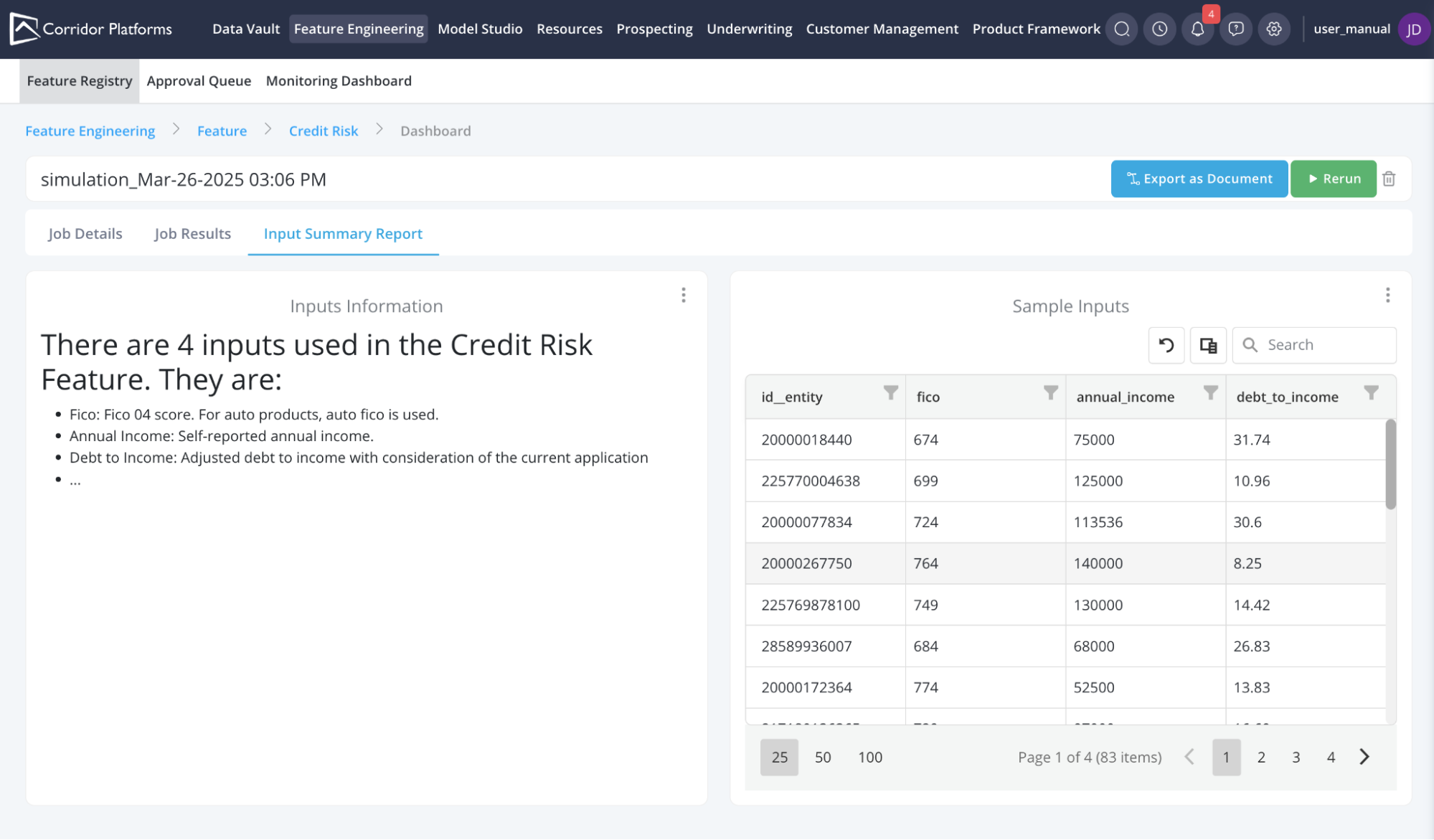
Section titled “2.1 Improved support for Table and Excel Reports”Enhanced report support adds flexibility to data visualization and analysis in the Job Dashboard. Improving the experience for various types of visualizations that a report can create.
This update introduces multiple format options for displaying and managing your data, including:
- Tables: Visualize pandas dataframes as tables with features like filtering, sorting, search, pagination, and Excel download
- Markdown: Effortlessly display well-formatted documentation with markdown support.
- Excel: Download job results in a structured Excel format.
- PDF: Generate reports as PDF files.
- Downloadable Zip File: Package and download multiple outputs conveniently.
2.2 More options to support Recurring Jobs
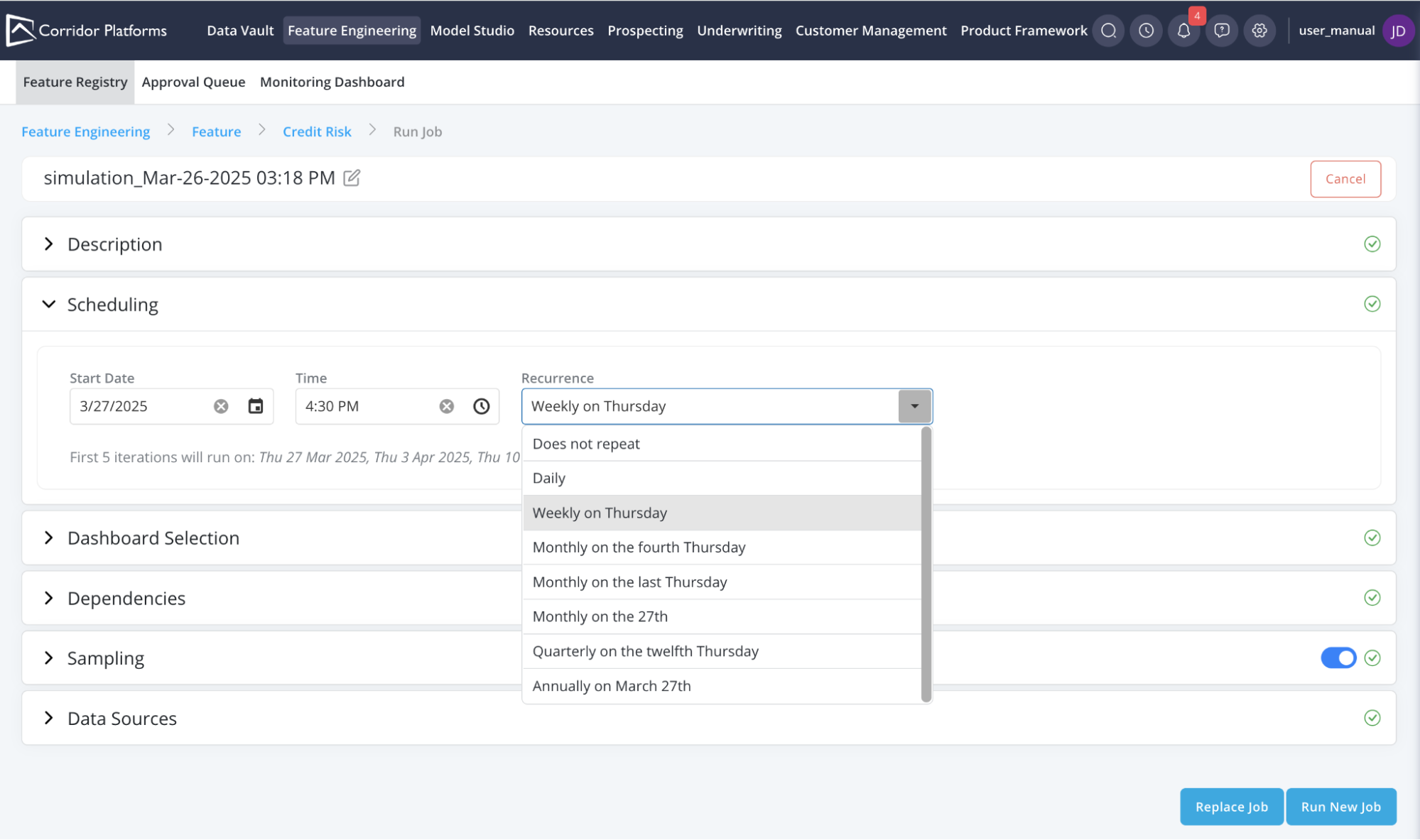
Section titled “2.2 More options to support Recurring Jobs”Newly added support for setting up recurring jobs with ease. Key features include:
- Flexible Recurrence Interval : Schedule tasks daily, weekly, monthly, quarterly, and beyond.
- Streamlined Interface: Simplified design for effortless job setup.
3. Approvals & Monitoring
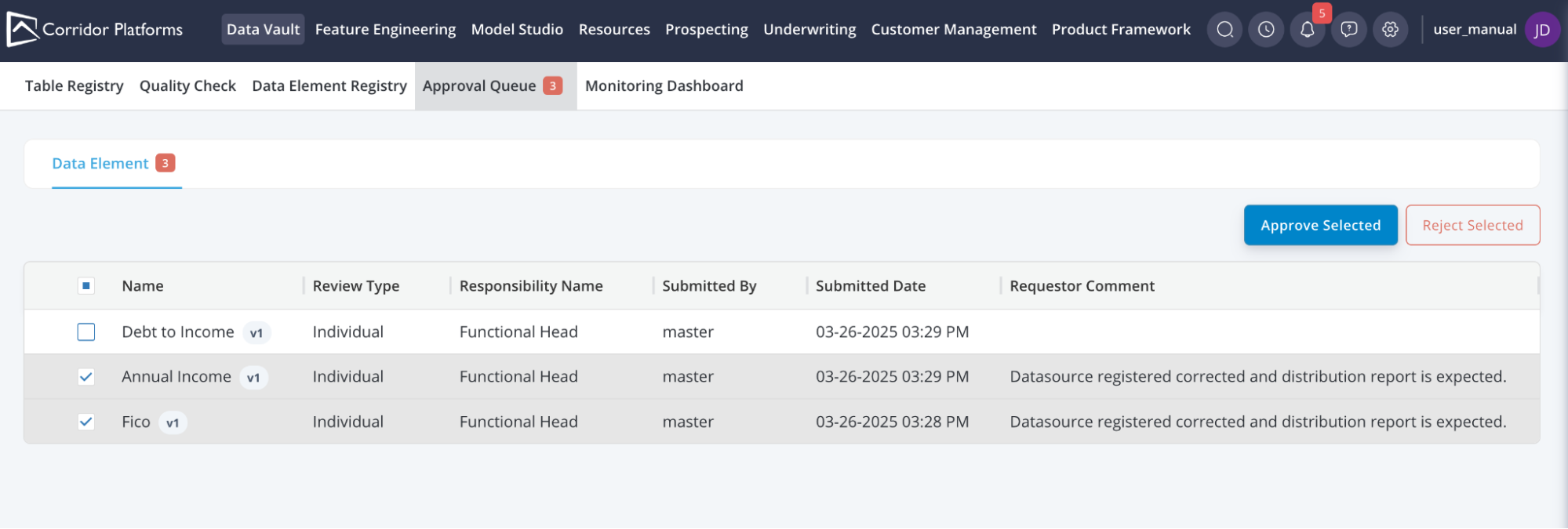
Section titled “3. Approvals & Monitoring”3.1 Approve Multiple Objects in Approval Queue
Section titled “3.1 Approve Multiple Objects in Approval Queue”While group approvals help with handling objects which have a large or deep lineage, sometimes the approvals backlogs can be very high - especially for Simple Data Elements where there is no definition to approve.
Now, access relevant information directly in the Approval Queue and select the items to approve quickly.
3.2 Flexible Approval Workflow Management
Section titled “3.2 Flexible Approval Workflow Management”Managing the existing approval workflow just got simpler!
As a first step toward greater flexibility, you can now edit the names and descriptions of approval workflows, even while they are actively in use for approvals.
Stay tuned: there’s more on the way in our next release!
4. Various Usability Improvements
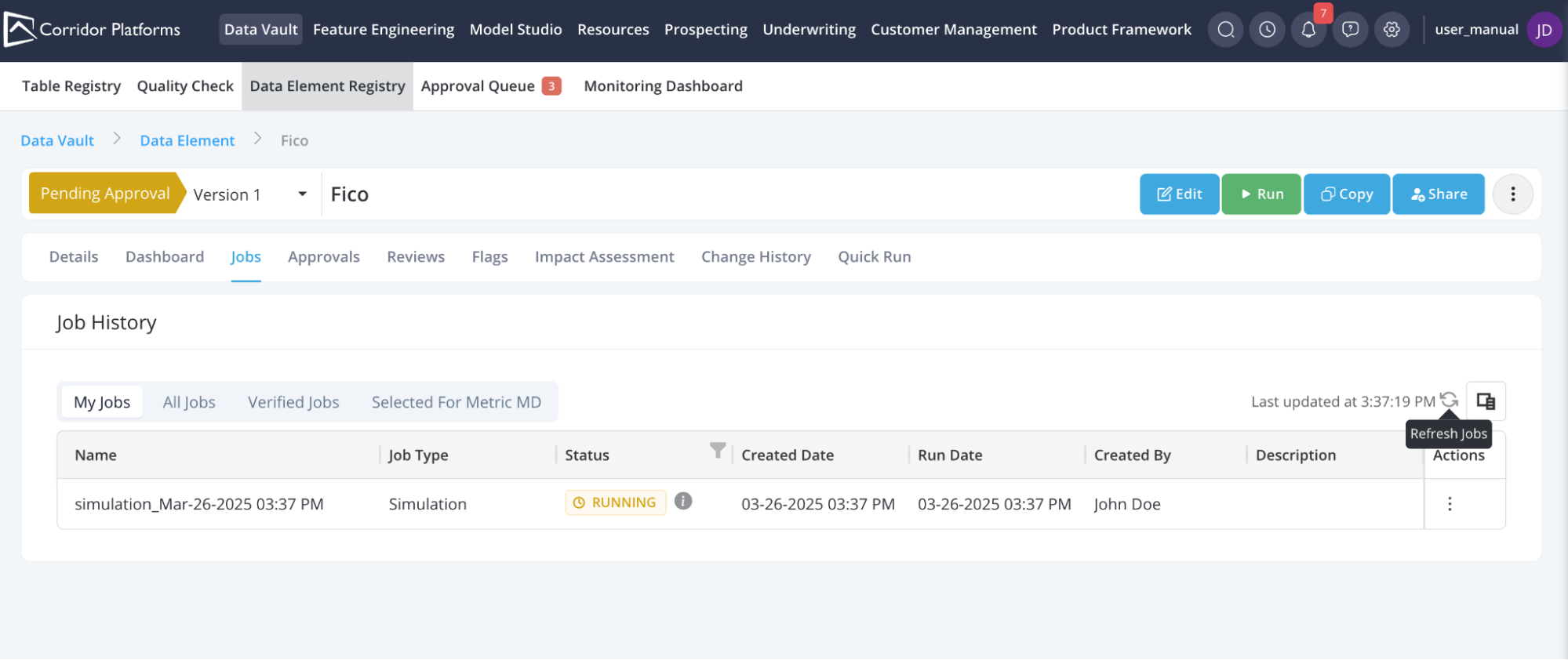
Section titled “4. Various Usability Improvements”4.1 Refresh Button for Job History Page
Section titled “4.1 Refresh Button for Job History Page”Unsure when the statuses for jobs were last updated ?
Now users can see the last refresh time on the Jobs tab and also refresh the latest status, no waiting required!
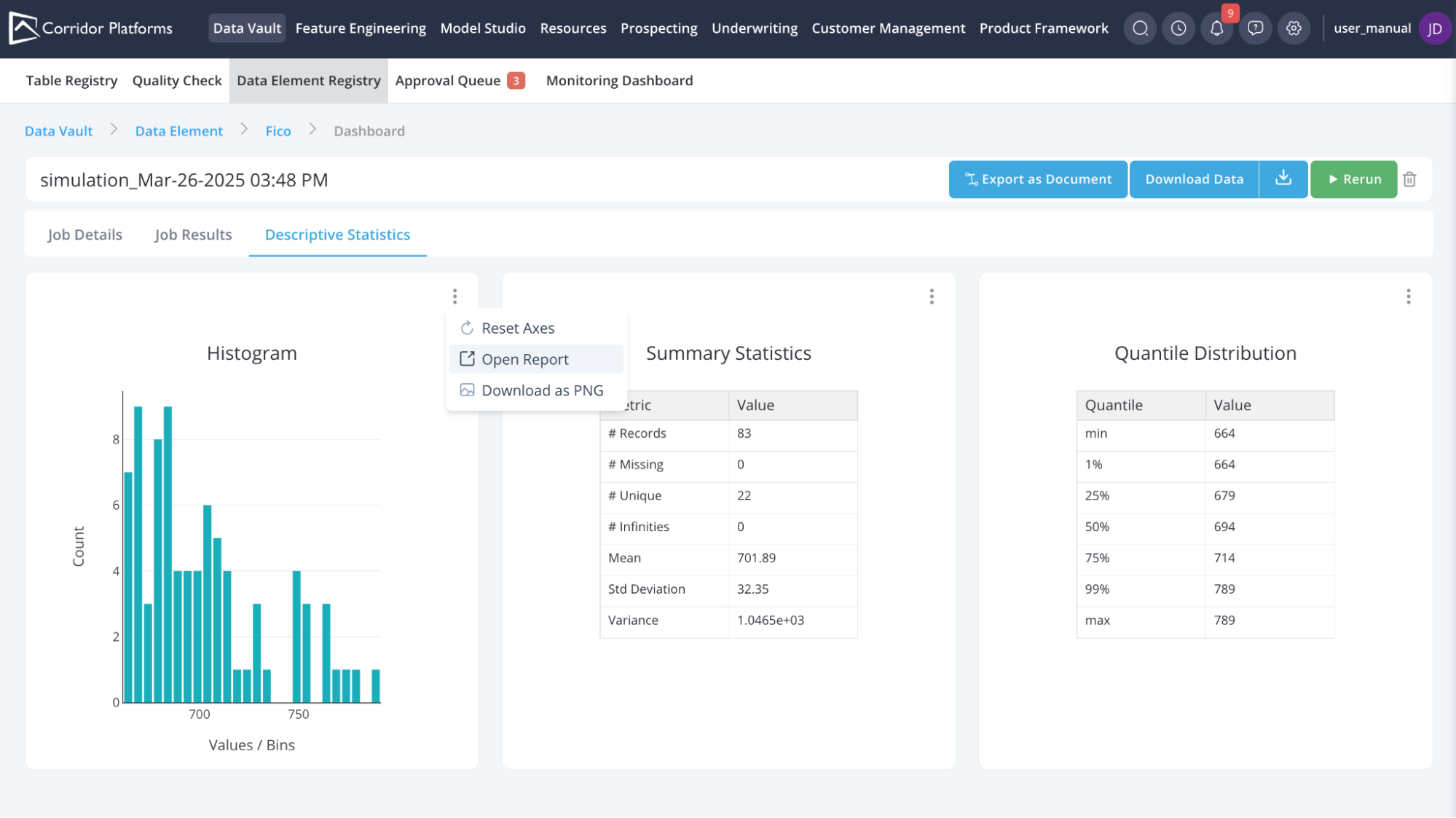
4.2 Direct Access to Report Definition from Job Dashboard
Section titled “4.2 Direct Access to Report Definition from Job Dashboard”Easier debugging and understanding the report by accessing the report definition directly from Job Dashboard
4.3 Focus on common actions in an object
Section titled “4.3 Focus on common actions in an object”Buttons in the name-bar are organized to make it easier to focus on the four most frequently used functions on the page, while placing lesser-used options neatly in a hidden dropdown for improved accessibility and workflow efficiency.

4.4 Show warnings when Corridor Package in notebook is not updated
Section titled “4.4 Show warnings when Corridor Package in notebook is not updated”When using the Notebook integration of Corridor - It is common to have various virtual environments with differing python versions and other libraries required for modeling work. As Corridor versions are updated, it can be hard to keep track of the corridor python-package versions leading to unusual errors for deprecated features.
Now, when the corridor package is used in Notebooks and a version mismatch is detected, a warning is shown to users about the mismatch with a recommendation on updating the package:
WARNING: Corridor Package Version mismatch detected!
Installed python package version: v1.24.0
Platform version: v1.25.4
This may cause compatibility issues.
Please update the corridor-python package to avoid any unexpected errors.
5. Technology Updates
Section titled “5. Technology Updates”5.1 Support for Python 3.7 and Python 3.8 removed
Section titled “5.1 Support for Python 3.7 and Python 3.8 removed”Python 3.7 and 3.8 which are currently in end-of-life status as per Python Software Foundation, were in security-support mode in v1.24.x. In this release, the support for these versions is dropped.
5.2 Need for a common file-storage across API and Worker Spark processes
Section titled “5.2 Need for a common file-storage across API and Worker Spark processes”While this is optional in v1.25.4, in future releases - a common file-storage will be mandatory across API and Worker Spark processes. This allows for much faster logging and progress updates about jobs across processes.
Currently statuses and logs for jobs are updated at the end of every simulation. But this is not helpful in the case of jobs which take a long time to run (for example - if a job takes 10 hrs to run, the user is unsure what the progress of the job is until the 10hrs complete
In future releases, we plan to move towards real-time logging - which requires a common file-storage (like a NAS or NFS system) between the worker-spark and api processes/machines.
5.3 Deprecated support for Spark 2.x
Section titled “5.3 Deprecated support for Spark 2.x”With the upcoming Spark 4.x release planned in June-2025 – Spark 2.x has reached its end of life from various communities. Apache declared Spark 2.x as end-of-life in 2021, and Cloudera will stop supporting it from Sept-2025.
With this release, Corridor now maintains security support for Spark 2.x and will drop support for it in future releases.
Was this page helpful?
Thanks for the feedback.