

Start with a Policy
Ask AI
A model tells you what is likely (for example, “this borrower has a 23% chance of defaulting”). A policy is what decides what to do about it: approve, decline, offer a smaller amount, reprice, or route to a human reviewer.
A policy in Corridor is a registered decision workflow that strings together rules, features, and model scores to produce an outcome. Once registered, it becomes a governed object with full lineage, version history, and an audit trail from configuration through to production.
Policies cover the full credit decisioning lifecycle:
- Prospecting: find and pre-qualify customers before they apply (for example, a pre-approved personal loan offer for savings account holders with FICO > 700).
- Underwriting: approve, decline, counter-offer, or refer an application at the point of decision, with segment-specific branches and risk-based pricing.
- Customer Management: ongoing decisions on the existing book, such as automatic credit-line increases for borrowers who have been 0 DPD for 18 months, or early-warning triggers when an EMI is missed.
Corridor brings all three into one governed platform, tightly integrated with analytic models and connected to your existing applications, databases, and vendors. Approved policies deploy as artifacts or as fully customized API endpoints.
The Policy Lifecycle
Section titled “The Policy Lifecycle”The flowchart below walks through the full policy lifecycle, from registering your source data and building risk attributes, through composing and simulating the decision workflow, to monitoring portfolio performance once the policy is live.
What happens at each step
Section titled “What happens at each step”| Step | Module | What you do |
|---|---|---|
| Pre-Production | ||
| 01Register Data | Data Vault | Connect and catalog your source data eg: loans, applications, credit bureau pulls, deposit history. Register the tables and expose the columns you need as data elements. |
| 02Build Risk Attributes | Feature Engineering | Transform the raw data into policy-side variables that rules and scorecards consume, e.g., risk tiers, DPDs, DTI, PTI, and LTV ratios. |
| 03In-House Scorecards | Model Studio | Optionally register an internal member scorecard to use alongside FICO, useful for thin-file or new-to-credit segments. |
| 04Build The Policy | Underwriting | Compose the decision workflow made of rules, cutoffs, routing, tier pricing, refer-to-underwriter paths, and approve/counter/decline outcomes. |
| 05Simulate | Underwriting | Replay the policy on past applications. Review approval rates by tier, why-declined breakdowns, and waterfall reports. Iterate across steps 04–05 until performance looks right. |
| 06Approve Policy | Underwriting | Route the locked version through credit committee review and sign-off with full audit trail and governance log attached. |
| 07Export Policy Package | Underwriting | Hand off to your LOS team as a deployable package: rules, cutoffs, and scorecard, exported as JSON or PMML or exposed as an API end point. |
| Live Decisioning · Outside Corridor | ||
| ··Your LOS & Core | Your stack | The exported package runs in your LOS and core (e.g., Fiserv Loan Director), producing live approve/counter/decline decisions on member applications. |
| Post-Production | ||
| 08Bring Data Back In | Data Vault | Flow applications, decisions, bookings, days past due, and charge-offs back into Corridor to close the loop. |
| 09Monitor Performance | Underwriting | Track vintage and portfolio health: 30 / 60 / 90+ DPD, charge-off rate, fair lending. Set thresholdsm alerts to flag performance issues early on. When something drifts, refine attributes, models and re-approve through the same governed flow. |
What can you do on a policy?
Section titled “What can you do on a policy?”-
Register your policy, strategy and rules
Every policy is built from approved models, data elements, and features. Lineage is automatic and you can trace every rule and model input back to its source. Every version is tracked and every change is recorded with timestamps and authors.
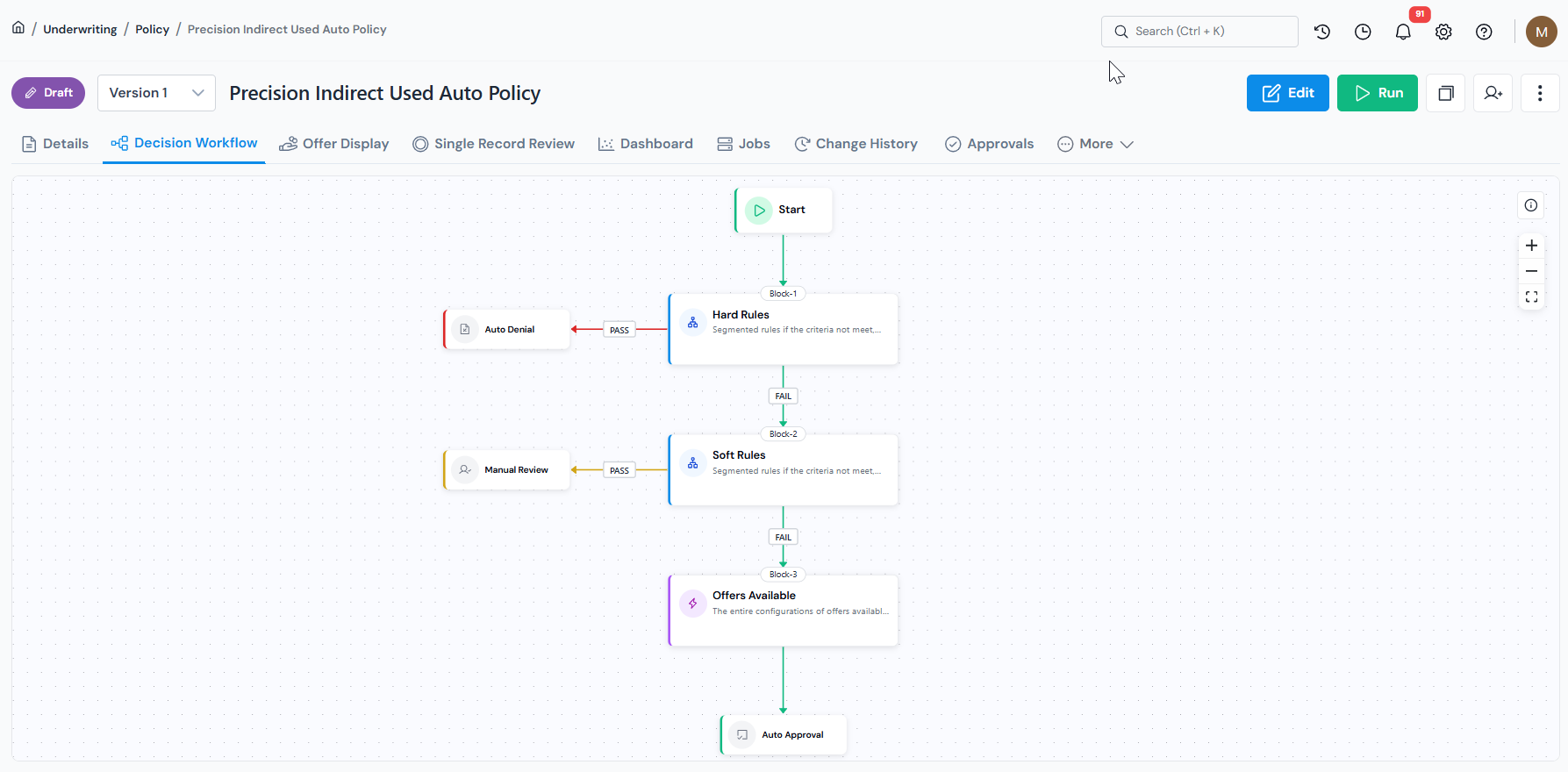
Policy page with the registered decision workflow view. Corridor integrates models from other vendors, models built in external modeling tools, and models trained natively on the platform, all composable into a single decision workflow.
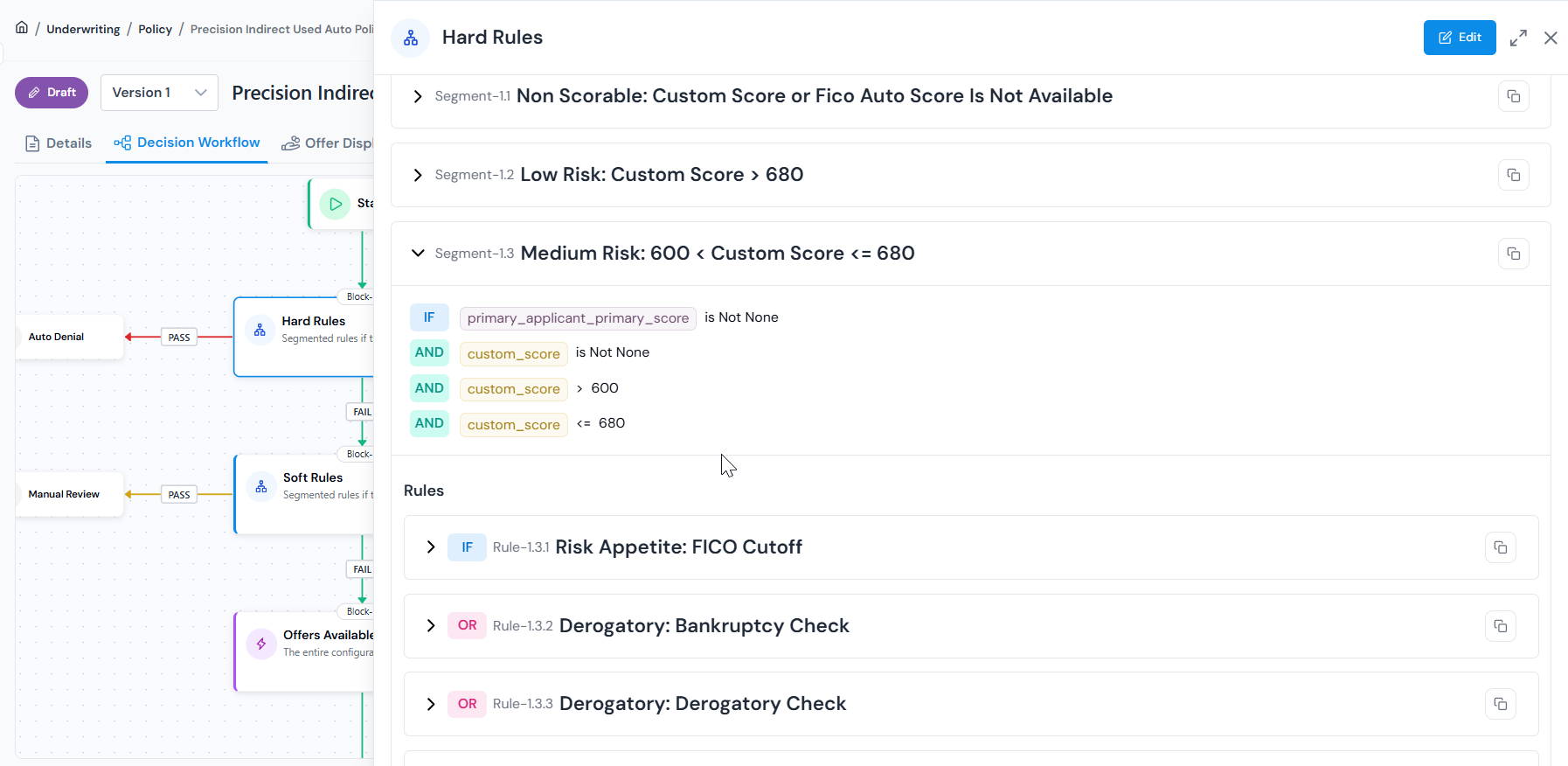
Compose rules, segments, and model scores into a single executable strategy. -
Simulate on your data before deployment
Run the policy against a real historical dataset and review outcomes in built-in dashboards. Out-of-the-box reporting covers business and risk metrics across applicant cohorts including decision waterfall, marginal impacts of rules, rule automation and performance metrics, and model risk management packages.
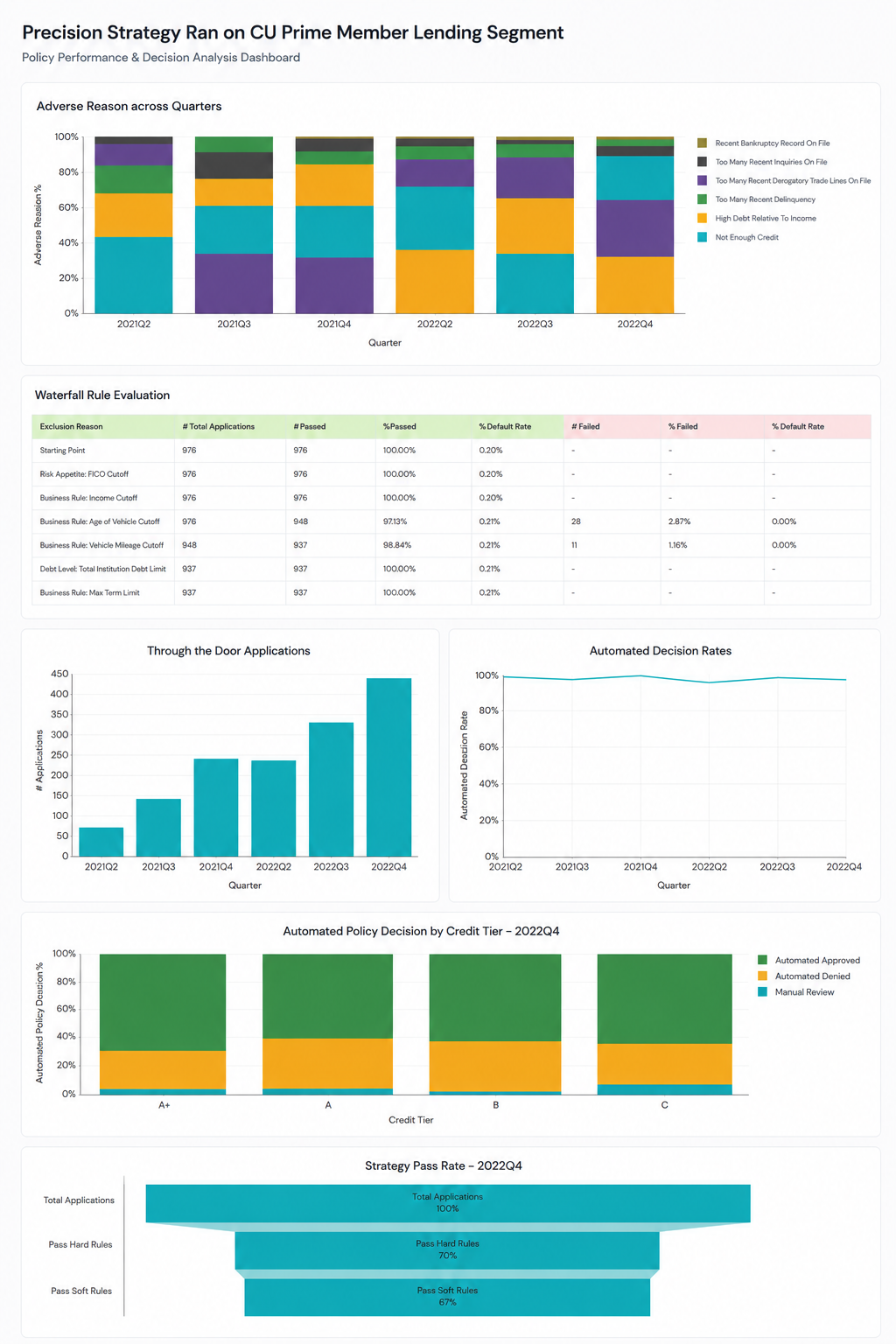
Simulation report covering decision waterfall, rule impact, and risk metrics across applicant cohorts. Run what-if analysis to adjust the policy slightly and see how it compares to the original before committing to any change.
Use Single Record Review to select any application and trace exactly how it moved through the workflow, which rules passed or failed, what offers were generated, and what the final outcome was.
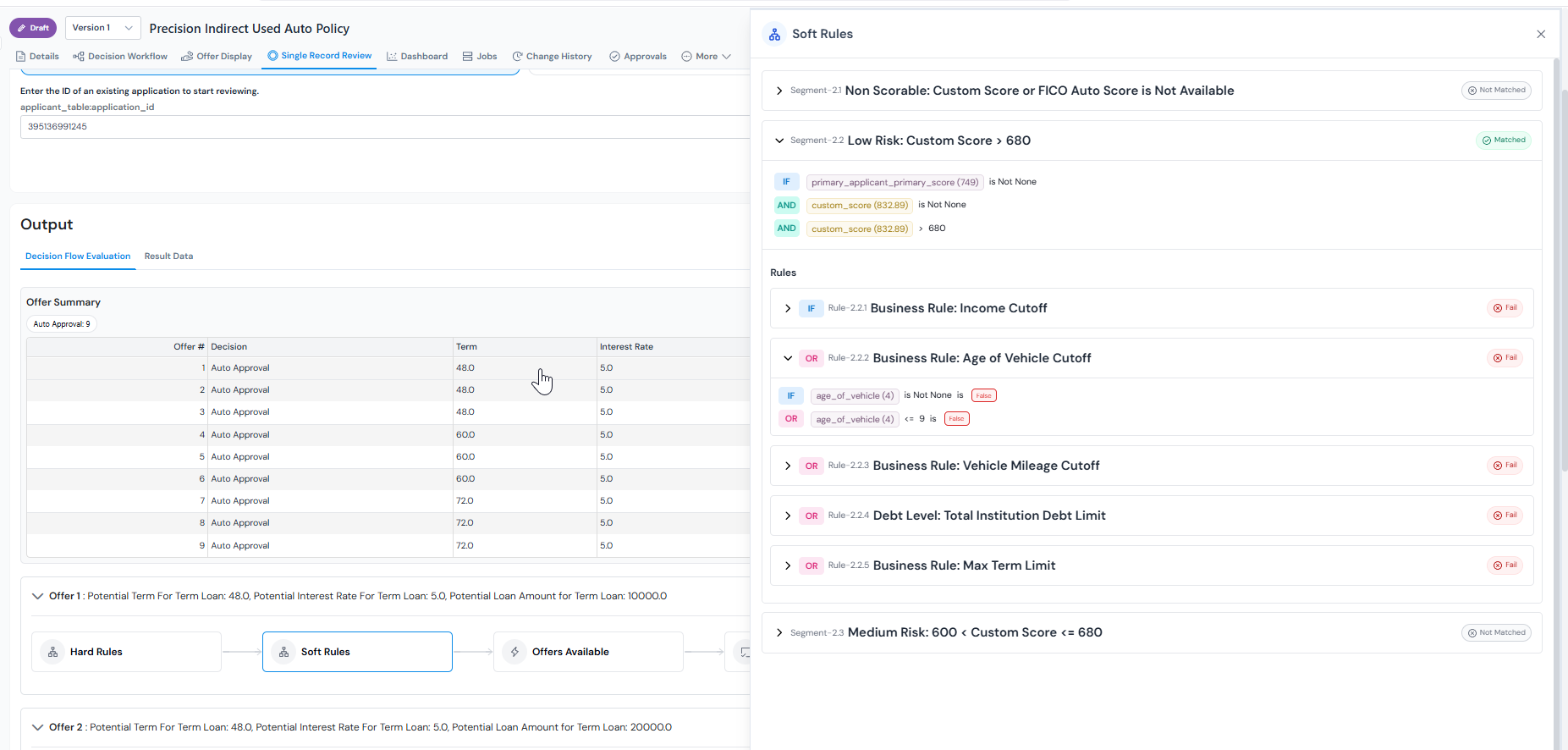
Single Record Review traces one application end-to-end through the policy workflow. -
Govern through formal approvals
Every change is a formal step. Reviewers get a dedicated queue where they can inspect the policy, view its lineage, check simulation results, leave comments, and approve or request changes, all in one place. Every decision stays permanently attached to the policy.
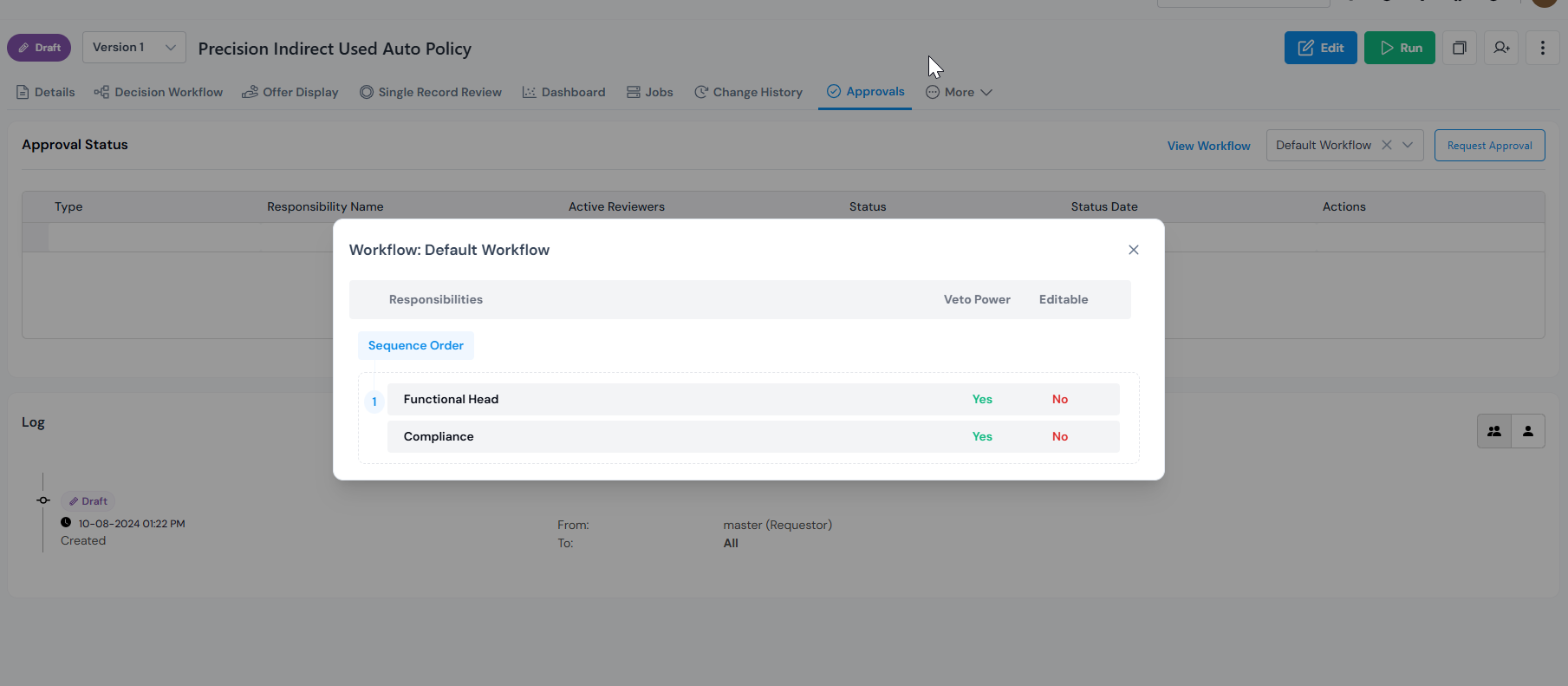
View of the approval workflow with responsbilities to request approval from shown. -
Run champion-challenger comparisons
Run champion-challenger scenarios with a few clicks to test a new strategy against the current production policy. Use the strategy builder to adjust cutoffs, add new segments, or introduce new features as applicant behaviour and market conditions change. Compare outcomes before promoting any changes to production.
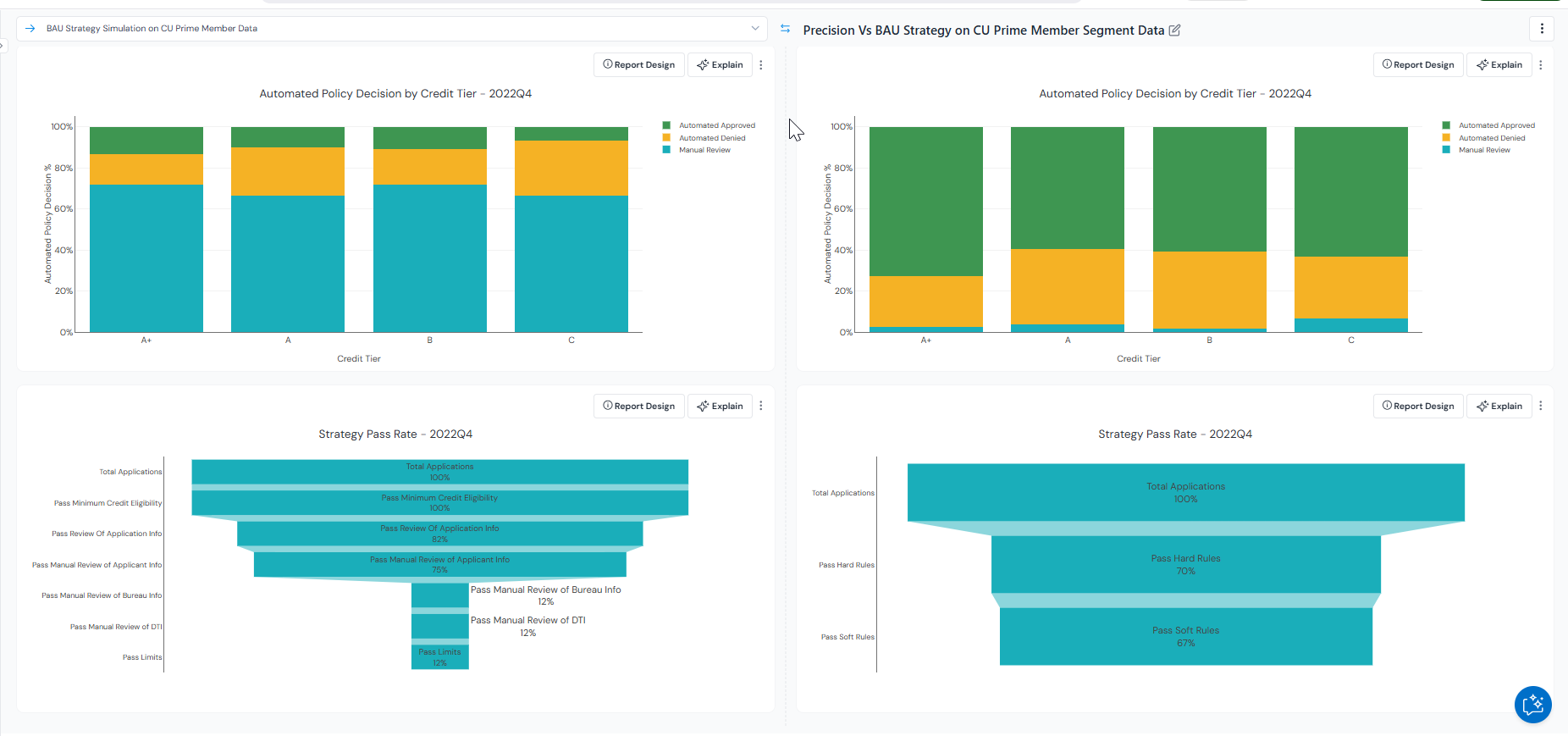
Champion vs. challenger comparison with side-by-side outcomes on the same dataset. -
Monitor in production
Set up ongoing monitoring of key KPIs including decision automation level, first payment defaults, approval rates, and conversion ratios. Set alerts on any metric and review governance status across all registered policies in one place.
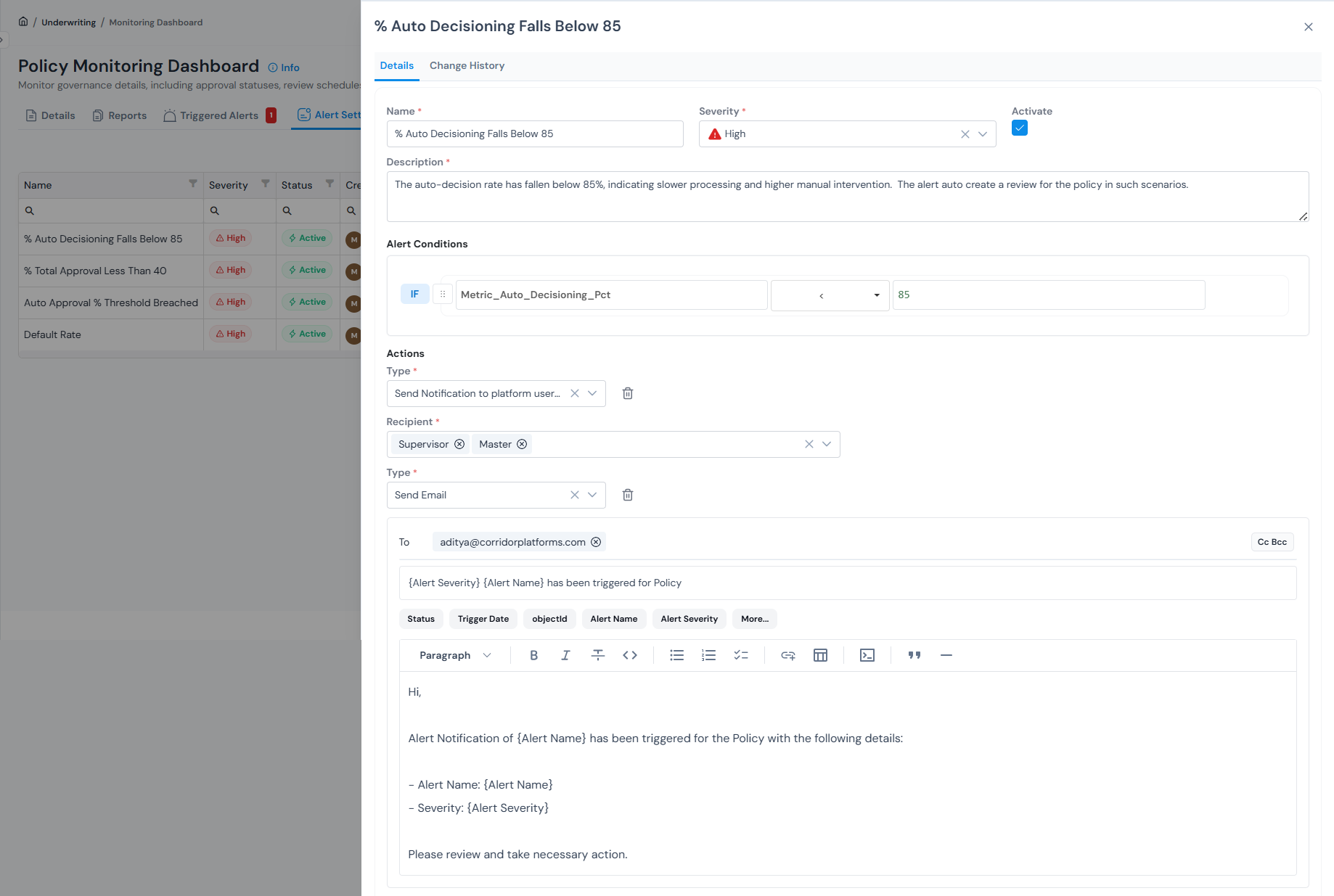
Monitoring dashboard tracking decisioning KPIs, with threshold-based alerts and email notifications.
Types of policy
Section titled “Types of policy”Corridor organises policies by where the borrower sits in their journey with you: before they apply, at the point of application, and after they are on your books. The diagram below traces that journey. The same registered-object lifecycle (build, simulate, approve, monitor) applies to all three; only the inputs, outcomes, and cadence change.
| Type | What it does | Example use case |
|---|---|---|
| Prospecting | Runs on bureau or marketing data to identify and target prospects with the right offer, before they apply. | Pre-approved personal loan offers for savings account holders with FICO above 700, individually sized and priced. |
| Underwriting | Runs at the point of application, evaluating the applicant against your rules, risk attributes, and scorecard cutoffs to return a decision with terms and pricing attached. | A 36-month loan for a salaried applicant with FICO 742 priced at 11.1% instead of the band rate of 11.5%. |
| Customer Management | Runs on your existing book, evaluating customers against updated data and behaviour signals to drive limit changes, cross-sell offers, collections triggers, and early-warning flags. | Automatic 30% line increase after 18 months at 0 DPD, or a proactive limit cut when utilisation hits 95% and a new bureau enquiry shows up. |
Register a policy?
Section titled “Register a policy?”Every policy is built around a decision workflow, a sequence of blocks that define each step in the evaluation process.
For the full step-by-step walkthrough of every field, block type, and configuration option see Register a Policy Decision Workflow.
Was this page helpful?
Thanks for the feedback.